
Toyota Corolla (E120) 2002–2008 Repair Manual / Diagnostics / Supplemental restraint system / Short in p/t squib (rh) circuit (to
ground) / Inspection procedure
Toyota Corolla (E120): Inspection procedure
1 Check p/t squib(rh) circuit(airbag sensor assy center – front seat outer belt assy rh)
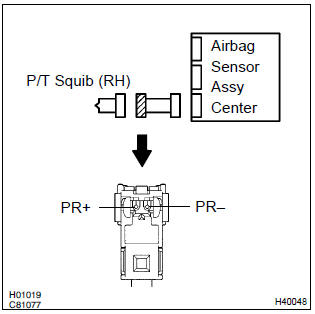
- Disconnect the negative (–) terminal cable from the battery, and wait at least for 90 seconds.
- disconnect the connectors between the airbag sensor assy center and the seat belt pretensioner (rh).
- for the connector (on the seat belt pretensioner side) between
the airbag sensor assy center and the seat belt pretensioner
(rh), measure the resistance between pr+
and body ground.
Ok: resistance: 1 mΩ or higher


2 Check air bag sensor assy center
Sst 09843–18040
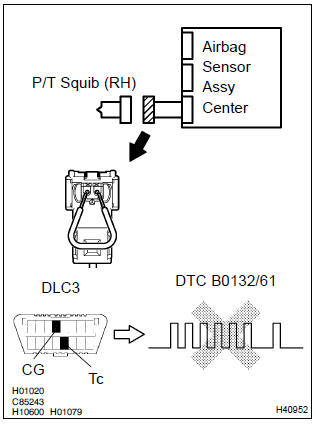
- Connect the connector to the airbag sensor assy center.
- using a service wire, connect pr+ and pr– of the connector (on the seat belt pretensioner side) between the airbag sensor assy center and the seat belt pretensioner (rh).
- connect the negative (–) terminal cable to the battery, and wait at least for 2 seconds.
- turn the ignition switch to on, and wait at least for 20 seconds.
- clear the dtc stored in memory .
- turn the ignition switch to lock, and wait at least for 20 seconds.
- turn the ignition switch to on, and wait at least for 20 seconds.
- check the dtc .
Ok: dtc b0132/61 is not output.
Hint
: codes other than code b0132/61 may be output at this time, but they are not relevant to this check.


3 Check p/t squib (rh)
Sst 09843–18040
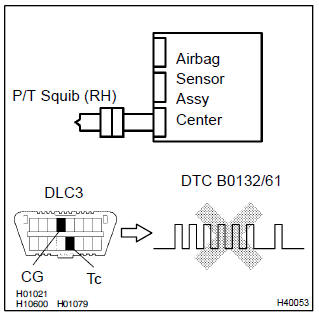
- Turn the ignition switch to lock.
- disconnect the negative (–) terminal cable from the battery, and wait at least for 90 seconds.
- connect the seat belt pretensioner (rh) connector.
- connect the negative (–) terminal cable to the battery, and wait at least for 2 seconds.
- turn the ignition switch to on, and wait at least for 20 seconds.
- clear the dtc stored in memory .
- turn the ignition switch to lock, and wait at least for 20 seconds.
- turn the ignition switch to on, and wait at least for 20 seconds.
- check the dtc .
Ok: dtc b0132/61 is not output.
Hint
: codes other than code b0132/61 may be output at this time, but they are not relevant to this check.


4 Use simulation method to check


Replace all srs components including the wire harness


Other materials:
Body panel sealing areas
Be sure to apply body sealer to the body panel joints and door edges (tip of
outer panel folded part), etc., To waterproof
and rustproof them.
Hint:
apply degreasing agent to a clean cloth and clean the sealer
application areas.
After removing the applied spot sealer from the se ...
Inspection procedure
Hint:
read freeze frame data using the hand-held tester or the obd ii scan tool.
Freeze frame data records the
engine conditions when a malfunction is detected. When troubleshooting, it is
useful for determining whether
the vehicle was running or stopped, the engine was warmed up or not, the ...
Tire & wheel
Wheel and tire system
Inspection
1. Inspect tire
check the tires for wear and proper inflation pressure.
Cold tire inflation pressure:
Using a dial indicator, check the tire runout.
Tire runout: 3.0 Mm (0.118 In.) Or less
2. Rotate tire
Hint:
see the illustration ...