
Toyota Corolla (E120) 2002–2008 Repair Manual / Lighting / License plate lamp assy
Toyota Corolla (E120): License plate lamp assy
Replacement
1. Remove luggage compartment lock cylinder & key set
2. Remove luggage compartment door garnish outside
3. Remove license plate lamp assy
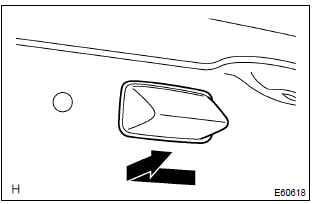
- Pull the license plate light assy to the side of vehicle as shown in the illustration and release the claw.
- disconnect the connector and remove the license plate light assy.
4. Install symbol emblem


Other materials:
Inspection procedure
1 Input signal check
See the input signal check on page 05–745.
check the indicator light when the clutch pedal is depressed.
Ok:
the indicator light goes off when the clutch pedal is
depressed.
2 Inspect terminal voltage(d)
Turn the ignition switch to on.
&n ...
Circuit description
Hint:
these dtcs indicate a malfunction related to the primary circuit.
If dtc p0351 is displayed, check the no.1 Ignition coil with igniter
circuit.
If dtc p0352 is displayed, check the no.2 Ignition coil with igniter
circuit.
If dtc p0353 is displayed, check the no.3 Ignition coil ...
Inspection procedure
Hint:
read freeze frame data using the hand-held tester or the obd ii scan tool.
Freeze frame data records the
engine conditions when a malfunction is detected. When troubleshooting, it is
useful for determining whether
the vehicle was running or stopped, the engine was warmed up or not, the ...