
Toyota Corolla (E120) 2002–2008 Repair Manual / Exhaust / Removal & installation and disassembly & reassembly
Toyota Corolla (E120): Removal & installation and disassembly & reassembly
1. Remove oxygen sensor
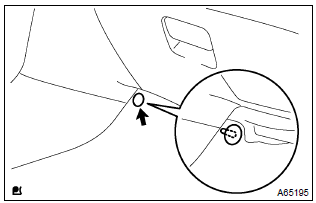
- Remove a clip and tear off the floor mat.
- disconnect a oxygen sensor connector.
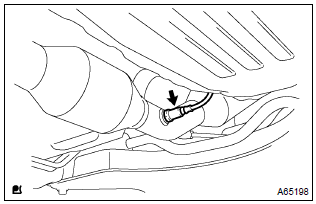
- Remove the oxygen sensor.
2. Remove tail pipe assy
- Remove 2 bolts, 2 springs and tail pipe assy.
3. Remove floor panel brace front
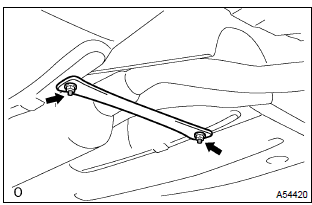
- Remove 2 nuts and the front floor panel brace front.
4. Remove exhaust pipe assy front
- Remove 2 bolts, 2 springs and exhaust pipe assy front.
5. Install exhaust pipe assy front
- using vernier calipers, measure the free length of the compression
spring.
Minimum length: 41.5 Mm (1.634 In.) Hint
: if the free length is less than minimum, replace the compression spring.
- install a new gasket on the exhaust manifold.
- install the exhaust pipe front with 2 bolts and 2 springs.
Torque: 43 nvm (440 Kgf·cm, 32 ft·lbf)
6. Install floor panel brace front
- install the front panel brace front with 2 nuts.
Torque: 30 nvm (302 Kgf·cm, 22 ft·lbf)
7. Install tail pipe assy
- using vernier calipers, measure the free length of the compression
spring.
Minimum length: 38.5 Mm (1.516 In.) Hint
: if the free length is less than minimum, replace the compression spring.
- install a new gasket on the exhaust pipe front.
- install the exhaust tail pipe with 2 bolts and 2 springs.
Torque: 43 nvm (440 Kgf·cm, 32 ft·lbf)
8. Install oxygen sensor
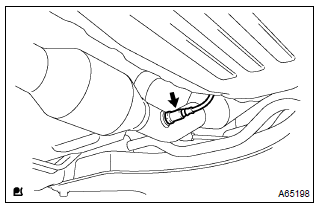
- Install the oxygen sensor to the exhaust pipe front.
Torque: 44 nvm (450 Kgf·cm, 33 ft·lbf)
- connect the oxygen sensor connector.
Hint
: after installing oxygen sensor, check that sensor wire is not twisted. If it is twisted, remove the oxygen sensor and reinstall it.
9. Check exhaust gas leak


Other materials:
Bluetooth® (Multimedia system)
Bluetooth®
■When using the Bluetooth® audio system
●In the following conditions, the system may not function.
• If the portable audio player is turned off
• If the portable audio player is not connected
• If the portable audio player’s battery is low
●There may be a ...
Dtc check/clear
1. Dtc check (normal mode)
Notice:
hand–held tester only:
when the diagnostic system is switched from the normal
mode to the check mode, all the dtcs and freeze frame
data recorded in the normal mode will be erased. So before
switching modes, always check the dtcs and freeze frame
data, and ...
Foamed material application areas
If an increase in temperature or other condition damages the foamed material
when repairing or replacing the panel,
fill in the insufficient areas with urethane foam. The following illustration
shows the areas for one side, but the
foamed material must be applied equally to both the left and r ...