
Toyota Corolla (E120): Overhaul
1. Remove bench type rear seat cushion assy
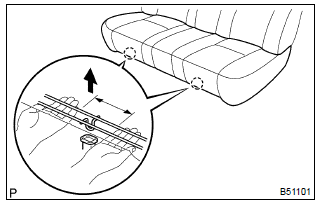
- Disengage the 2 clamps, and then remove the seat cushion.
2. Remove separate type rear seat back assy
- lean the seat back forward.
- remove the 2 clips.
- remove the 2 bolts and seat back lh.
- employ the same manner described above to the other side.
3. Remove bench type rear seat cushion cover
- remove the hog rings and seat cushion cover.
4. Remove separate type rear seat back cover
- remove the hog rings, and then turn up the seat back cover lh.
- remove the headrest supports, seat back cover lh and seat back pad lh.
- employ the same manner described above to the other side.
5. Install separate type rear seat back cover
- install the seat back pad lh to the seat back frame lh.
- cover the top of the seat back with the seat back cover lh.
- install the headrest supports.
- using hog ring pliers, fully install the seat back cover lh with new hog rings.
- employ the same manner described above the other side.
6. Install bench type rear seat cushion cover
- using hog ring pliers, install the seat cushion cover with new hog rings.
7. Install separate type rear seat back assy
- install the seat back lh with the 2 bolts and 2 clips.
Torque: 18 nvm (185 kgfvcm, 13 ftvlbf)
- employ the same manner described above to the other side.
8. Install bench type rear seat cushion assy
- insert the seat cushion under the seat back.
- engage the 2 clamps.


Other materials:
Inspection procedure
Hint:
read freeze frame data using the hand-held tester or the obd ii scan tool.
Freeze frame data records the
engine conditions when a malfunction is detected. When troubleshooting, it is
useful for determining whether
the vehicle was running or stopped, the engine was warmed up or not, the ...
Inspection
1. Spark plug
Notice:
never use a wire brush for cleaning.
Never attempt to adjust the electrode gap on used
spark plug.
Spark plug should be replaced every 192,000 km
(120,000 miles).
Clean the spark plugs.
Air pressure: below 588 kpa (6.0 Kg/cm2, 85 psi)
duration: 20 sec ...
Cleaning and protecting the vehicle interior
The following procedures will help protect your vehicle’s interior and keep
it in top condition:
Protecting the vehicle interior
Remove dirt and dust using a vacuum cleaner. Wipe dirty surfaces with a cloth
dampened with lukewarm water.
Cleaning the synthetic leather areas
● Remove l ...