
Toyota Corolla (E120): Noise occurs
Inspection procedure
1 Check of speaker installation
- Check speaker installation condition.
- Check that each speaker is securely installed.
Standard: malfunction disappear.
Hint
: the radio is equipped with noise prevention system that does not work against the regular use of the radio, thereby excessively large noise cannot occur in the radio. If large noise occurs, check whether or not the earth on the antenna installation part and the proper noise–prevention equipment are all installed, and whether or not the improper wiring is held.
Hint
:
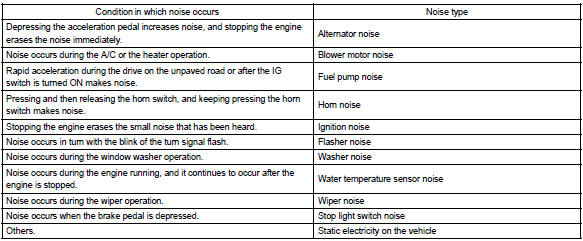
- identify the condition under which the noise occurs, and check the noise filter on the related part.
- Make sure first that there is no noise from outside. Failing to do so makes the noise occurrence source detection impossible and leads to misunderstanding.
- The noise should be removed in descending order of loudness.


Identification of noise source


Other materials:
Diagnostic trouble code chart
Hint:
when the srs warning light remains lit up and the dtc is the normal
code, this means a voltage source
drops.
This malfunction is not stored in memory by the airbag sensor assy center
and if the power source
voltage returns to normal, the srs warning light will autom ...
Maintenance requirements
To ensure safe and economical driving, day-to-day care and regular maintenance
are essential. It is the owner’s responsibility to perform regular checks. Toyota
recommends the following maintenance:
General maintenance
General maintenance should be performed on a daily basis. This can be don ...
Using a flat bed truck
If you use chains or cables to tie down your vehicle, the angles shaded in black
must be 45°.
Do not overly tighten the tie downs or the vehicle may be damaged.
■Before emergency towing
1 Vehicles without a smart key system: Put the engine switch in the “ACC” (engine
off) or “O ...