
Toyota Corolla (E120) 2002–2008 Repair Manual / Diagnostics / Supplemental restraint system / Open in p squib (2nd step) circuit / Inspection procedure
Toyota Corolla (E120): Inspection procedure
1 Check p squib circuit(airbag sensor assy center – instrument panel passenger airbag assy)
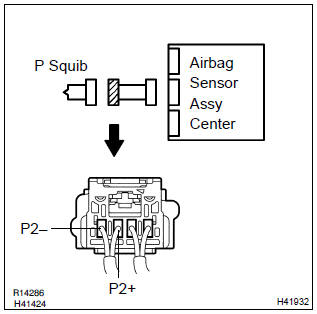
- Disconnect the negative (–) terminal cable from the battery, and wait at least for 90 seconds.
- disconnect the connectors between the airbag sensor assy center and the instrument panel passenger airbag assy.
- for the connector (on the instrument panel passenger airbag
assy side) between the airbag sensor assy center
and the instrument panel passenger airbag assy, measure
the resistance between p2+ and p2–.
Ok: resistance: below 1Ω


2 Check air bag sensor assy center
Sst 09843–18040
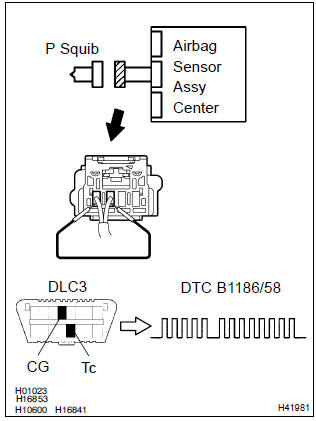
- Connect the connector to the airbag sensor assy center.
- using a service wire, connect p2+ and p2– of the connector (on the instrument panel passenger airbag assy side) between the airbag sensor assy center and the instrument panel passenger airbag assy.
- connect the negative (–) terminal cable to the battery, and wait at least for 2 seconds.
- turn the ignition switch to on, and wait at least for 20 seconds.
- clear the dtc stored in memory .
- turn the ignition switch to lock, and wait at least for 20 seconds.
- turn the ignition switch to on, and wait at least for 20 seconds.
- check the dtc .
Ok: dtc b1186/58 is not output.
Hint
: codes other than code b1186/58 may be output at this time, but they are not relevant to this check.


3 Check p squib
Sst 09843–18040
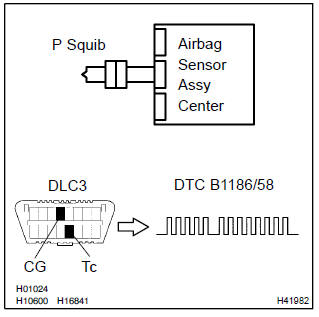
- Turn the ignition switch to lock.
- disconnect the negative (–) terminal cable from the battery, and wait at least for 90 seconds.
- connect the instrument panel passenger airbag assy connector.
- connect the negative (–) terminal cable to the battery, and wait at least for 2 seconds.
- turn the ignition switch to on, and wait at least for 20 seconds.
- clear the dtc stored in memory .
- turn the ignition switch to lock, and wait at least for 20 seconds.
- turn the ignition switch to on, and wait at least for 20 seconds.
- check the dtc .
Ok: dtc b1186/58 is not output.
Hint
: codes other than code b1186/58 may be output at this time, but they are not relevant to this check.


Use simulation method to check


Other materials:
Monitor description
Dtc p0451, p0452 or p0453 is recorded by the ecm when the vapor pressure
sensor malfunctions.
P0451
The ecm senses pressure in the fuel tank using the vapor pressure sensor. The
ecm supplies the sensor
with a regulated 5 v reference–voltage and the sensor returns a signal voltage
betwee ...
For vehicles equipped with mobile communication system
Install an antenna as far as possible away from the ecu
and sensors of the vehicle’s electronic systems.
install an antenna feeder at least 20 cm (7.87 In.) Away
from the ecu and sensors of the vehicle’s electronic systems.
For details of the ecu and sensors locations, refer ...
Replacement
1. Remove clutch start switch assy
disconnect the clutch start switch assy connector.
remove the nut and clutch start switch assy from the clutch pedal
support.
2. Install clutch start switch assy
install the clutch start switch assy with the nut.
Torque: 15.68 Nv ...