
Toyota Corolla (E120) 2002–2008 Repair Manual / Diagnostics / Audio system / Cassette tape cannot be inserted or played
Toyota Corolla (E120): Cassette tape cannot be inserted or played
Wiring diagram
Inspection procedure
1 Check for any foreign object
- Check for any foreign object.
- Check that no foreign object or defect is detected in the cassette
tape player of radio receiver
assembly.
Standard: no foreign object and defect detected.


2 Check cassette tape
- Check the cassette tape.
- Check that the cassette tape is a normal tape to which music or
voice is recorded.
Standard: proper cassette tape to which music or voice is recorded.


3 Replace cassette tape with another and recheck
- Replace the cassette tape with another and recheck.
- Replace the faulty cassette tape with the normal one to see if the
same trouble occurs again.
Standard: the function is recovered to be normal.


4 Check if radio auto–search functions properly
- Check if the radio auto–search functions properly.
- Perform the auto–search of the radio and check that the operation
is normal.
Standard: the operation returns to be normal.


5 Inspect radio receiver assy(+b, acc, gnd)
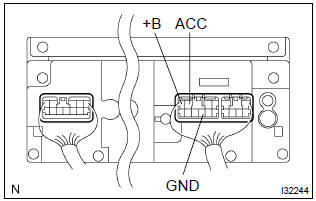
- Check that the continuity between terminals at each condition, as shown in the chart.
Standard:

- Check that the voltage between terminals at each condition, as shown in the chart.
Standard:



Repair or replace harness or connector


Other materials:
Unlocking and locking the doors from the inside
◆ Door lock switches
1 Locks all the doors
2 Unlocks all the doors
◆ Inside lock buttons
1 Locks the door
2 Unlocks the door
The front doors can be opened by pulling the inside handle even if the lock buttons
are in the lock position.
...
Out side moulding
Replacement
Hint:
use the same procedures for the rh side and lh side.
1. Remove outside moulding
Put protective tape around the moulding.
insert a piano wire between the vehicle body and moulding.
tie objects that can serve as handles (for example, wooden
blocks) to all ...
Air outlets
■ Location of air outlets
The air outlets and air volume changes according to the selected airflow mode.
: Some models
■ Adjusting the position of and opening and closing the air outlets
► Front center outlets
Direct air flow to the left or right, up or down.
► Fron ...