
Toyota Corolla (E120) 2002–2008 Repair Manual / Steering column / Steering system / Problem symptoms table
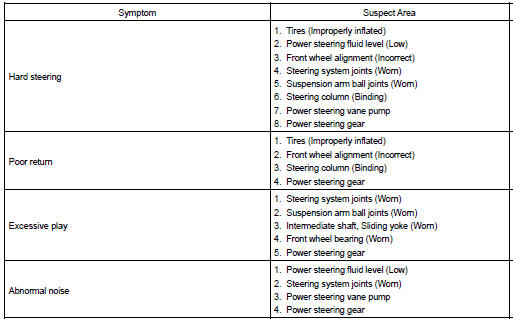
Toyota Corolla (E120): Problem symptoms table
Use the table below to help you find the cause of the problem. The numbers indicate the priority of the likely cause of the problem. Check each part in the order shown. If necessary, repair or replace these parts.


Other materials:
Tire pressure warning system (if equipped)
Your vehicle is equipped with a tire pressure warning system that uses tire pressure
warning valves and transmitters to detect low tire inflation pressure before serious
problems arise.
◆ Installing tire pressure warning valves and transmitters
When replacing tires or wheels, tire press ...
Inspection procedure
1 Check p squib circuit(airbag sensor assy center – instrument
panel passenger airbag assy)
Disconnect the negative (–) terminal cable from the battery,
and wait at least for 90 seconds.
disconnect the connectors between the airbag sensor
assy center and the instrument panel ...
Odometer and trip meter
display
■ Changing the display
Press the display change button
until the desired item is displayed.
■ Display items
Odometer
Displays the total distance the vehicle
has been driven.
Trip meter A/Trip meter B
Displays the distance the vehicle
has been driven since the meter
was last reset. Trip me ...