
Toyota Corolla (E210) 2019-2026 Owners Manual / Vehicle status information and indicators / Fuel consumption information
Toyota Corolla (E210): Fuel consumption information
Fuel consumption information can be displayed on the audio system screen.
System components
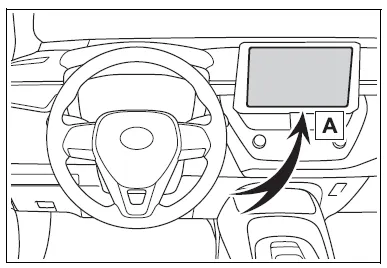
- Audio system screen
Consumption
■ Trip information
1. Select  on the main menu.
2. Select "Trip information".
If a screen other than "Current" is displayed, select "Current".
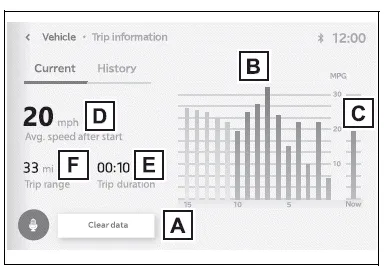
The image is an example only, and may vary slightly from actual conditions.
- Resetting the consumption data
- Fuel consumption in the past 15 minutes
- Current fuel consumption
- Average vehicle speed since the engine was started.
- Elapsed time since the engine was started.
- Cruising range
Average fuel consumption for the past 15 minutes is divided by color into past averages and averages attained since the engine switch was last turned to ON. Use the displayed average fuel consumption as a reference.
■ History
1. Select  on the main menu.
2. Select "Trip information".
If a screen other than "History" is displayed, select "History".
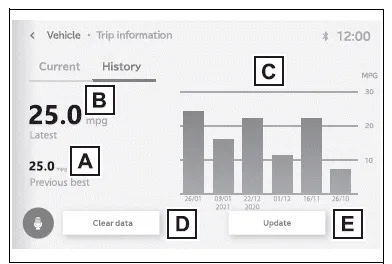
The image is an example only, and may vary slightly from actual conditions.
- Best recorded fuel consumption
- Latest fuel consumption
- Previous fuel consumption record
- Resetting the history data
- Updating the latest fuel consumption data
The average fuel consumption history is divided by color into past averages and the average fuel consumption since the last updated. Use the displayed average fuel consumption as a reference.
■Updating the history data
Update the latest fuel consumption by selecting "Update" to measure the current fuel consumption again.
■Resetting the data
The fuel consumption data can be deleted by selecting "Clear data".
■Cruising range
Displays the estimated maximum distance that can be driven with the quantity of fuel remaining.
This distance is computed based on your average fuel consumption.
As a result, the actual distance that can be driven may differ from that displayed.


Other materials:
Lower ball joint assy front lh
Replacement
Hint: components:
1. Inspect lower ball joint assy front lh
Jack up front side of the vehicle.
check the rattle of the lower ball joint assy front lh.
2. Remove front wheel
3. Remove front axle hub lh nut
sst 09930–00010
4. Disconnect speed sensor front lh (w/ ...
On–vehicle inspection
1. Inspect turn signal flasher relay circuit
Disconnect the connector from the turn signal flasher
relay and inspect the connector on wire harness side as
shown in the chart.
Standard:
Connect the connector to the turn signal flasher and inspect
the wire harness side connector ...
Repair
1. Steering off center repair procedure
Inspect steering wheel off center.
Apply masking tape on the top center of the steering
wheel and steering column upper cover.
Driving the vehicle on a straight line for 100 meters
at a constant speed of 35 mph (56 km/h), and ho ...