
Toyota Corolla (E120) 2002–2008 Repair Manual / Diagnostics / Sfi system / Readiness monitor drive pattern / Oxygen sensor monitor (front and rear o2s system)
Toyota Corolla (E120): Oxygen sensor monitor (front and rear o2s system)
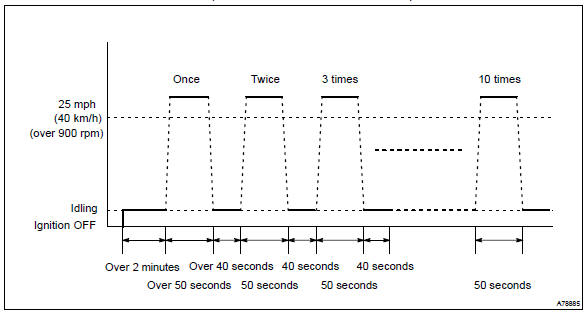
- Preconditions
The monitor will not run unless:
- mil is off
- drive pattern
- connect the obd ii scan tool to the dlc3 to check monitor status and preconditions.
- Start the engine and allow it to idle for 2 minutes or more.
- Drive the vehicle at 25 mph (40 km/h) or more for at least 50 seconds.
- Stop the vehicle and allow the engine to idle for 40 seconds or more.
- Perform steps (3) and (4) ten times.
- If the readiness status dose not switch to complete, make sure that the preconditions are met and the ignition switch is turned off and then repeat steps (1) through (5).


Other materials:
For your information
Main Owner’s Manual
Please note that this manual applies to all models and explains all equipment,
including options. Therefore, you may find some explanations for equipment not installed
on your vehicle.
All specifications provided in this manual are current at the time of printing.
Howeve ...
Calculation formula for your vehicle
1 Cargo capacity
2 Total load capacity (vehicle capacity weight)
When 2 people with the combined weight of A lb. (kg) are riding in your vehicle,
which has a total load capacity (vehicle capacity weight) of B lb. (kg), the available
amount of cargo and luggage load capacity will be C lb. (kg ...
Circuit description
Refer to dtc p0130
Dtc no.
Dtc detection condition
Trouble area
P0133
After engine has been warmed up, if response time that heated
oxygen sensor’s output voltage reaches from rich to lean.
Or from lean to rich, is 0.6 Second or more during idling.
...