
Toyota Corolla (E120) 2002–2008 Repair Manual / Diagnostics / Sfi system / Readiness monitor drive pattern / Oxygen / af sensor heater monitor
Toyota Corolla (E120): Oxygen / af sensor heater monitor
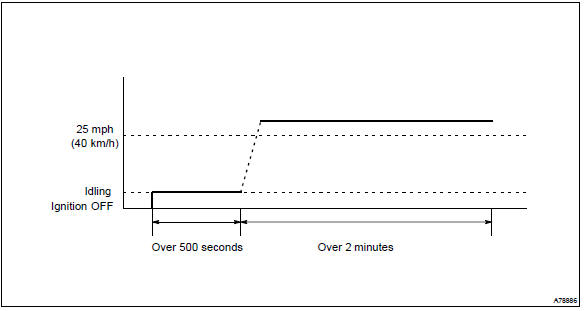
- Preconditions
The monitor will not run unless:
- mil is off
- drive pattern
- connect the obd ii scan tool to the dlc3 to check monitor status and preconditions.
- Start the engine and allow it to idle for 9 minutes.
- Drive the vehicle at 25 mph (40 km/h) or more for at least 2 minutes.
- If the readiness status dose not switch to complete, make sure that the preconditions are met and the ignition switch turned off and then repeat steps (2) and (3).


Other materials:
Preparations to use wireless communication
The following can be performed using Bluetooth® wireless communication:
■ A portable audio player can be operated and listened to via multimedia system
■ Hands-free phone calls can be made via a cellular phone In order to use wireless
communication, register and connect a Bluetooth ...
Inspection procedure
Hint:
read freeze frame data using the hand-held tester or the obd ii scan tool.
Freeze frame data records the
engine conditions when a malfunction is detected. When troubleshooting, it is
useful for determining whether
the vehicle was running or stopped, the engine was warmed up or not, the ...
Cup holders
Front
Rear (if equipped)
Pull the armrest down.
WARNING
■Items unsuitable for the cup
holder
Do not place anything other than
cups or beverage cans in the cup
holders.
Other items may be thrown out of
the holders in the event of an
accident or sudden braking and
cause injury. If possible, cover ...