
Toyota Corolla (E120) 2002–2008 Repair Manual / Diagnostics / Sfi system / Readiness monitor drive pattern / Evap monitor (vacuum pressure monitor) (continued)
Toyota Corolla (E120): Evap monitor (vacuum pressure monitor) (continued)
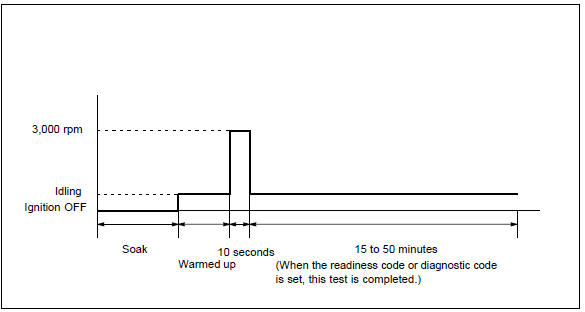
- Preconditions
The monitor will not run unless:
- mil is off.
- Fuel level is approximately 1/2 to 3/4.
- Altitude is 7800 feet (2400 m) or less.*
- Engine coolant temperature (ect) is between 40°f and 95°f (4.4 °C and 35 °C).
- Intake air temperature (iat) is between 40°f and 95 °f (4.4 °C and 35 °C).*
- Cold soak procedure has been completed.
- Before starting the engine, the difference between ect and iat must be less than 13°f (7 °C).
Hint
:
examples:
- scenario 1
ect = 75°f (24 °C)
iat = 60°f (16 °C)
difference between ect and iat is 15°f (8 °C).The monitor will not run because difference between ect and iat is greater than 13°f (7 °C).
- Scenario 2
ect = 70°f (21 °C)
iat = 68°f (20 °C)
difference between ect and iat is 2°f (1 °C).The monitor will run because difference between ect and iat is less than 13°f (7 °C).
Notice
: * note for 2002 and later my vehicles: the readiness test can be completed in cold ambient conditions (less than 40°f / 4.4 °C) and/or at high altitudes (more than 7800 feet / 2400 m) if the drive pattern is repeated a second time after cycling the ignition off.
- Drive pattern
- connect the obd ii scan tool to dlc3 to check monitor status and preconditions.
- Release pressure in the fuel tank by removing and then reinstalling the fuel tank cap.
- Start the engine and allow it to idle until ect becomes 167°f (75 °C) or greater.
- Run the engine at 3,000 rpm for about 10 seconds.
- Allow the engine to idle with the a/c on (to create slight load) for 15 to 50 minutes.
Notice
: if the vehicle is not equipped with a/c put a slight load on the engine by doing the following :
- securely set the parking brake.
- Block the drive wheels with wheel chocks.
- Allow the vehicle to idle in drive for 15 to 50 minutes.


Other materials:
Symptom confirmation and diagnostic trouble code
Hint:
the diagnostic system in corolla has various functions. The first
function is the diagnostic trouble
code (dtc) check, in which a malfunction in the signal circuits to the ecu
is stored in code form in
the ecu memory. Another function is the input signal check, which checks if
...
Circuit description
Refer to dtc p0115
Dtc no.
Dtc detection condition
Trouble area
P0116
If engine coolant temperature (ect) was between 35 c (95 °F)
and 60 c (140 °F) when starting the engine, and also conditions
(a) and (b) are met:
vehicle has run with acceleration an ...
Meter display
■ Locations of gauges and meters
The units of measure may differ depending on the intended destination of
the vehicle.
Tachometer
Displays the engine speed in revolutions per minute
Outside temperature
Displays the outside temperature within the range of -40ºF (-40ºC) to 140ºF
(60ºC)
...