
Toyota Corolla (E120) 2002–2008 Repair Manual / Sliding roof/convertible / Sliding roof system / On–vehicle inspection
Toyota Corolla (E120): On–vehicle inspection
1. Inspect sliding roof function
- check the slide opening operation (manual).
- Turn the ignition switch on.
- When keeping operating the sliding roof switch to the open side, check that the roof glass will slide and be fully opened.
- check the slide closing operation (manual).
- Turn the ignition switch on.
- When keeping operating the slide roof switch to close side, check that the roof glass will slide but stop halfway.
- When operating the sliding roof switch to the close side again after the above operation, check that the roof glass will slide again from the halfway position and be fully closed.
2. Inspect sliding roof drive gear
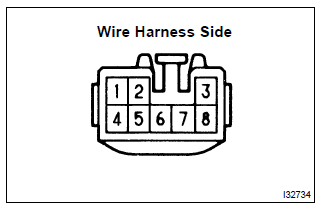
- Disconnect the connector from the relay and switch, and inspect the connector on the wire harness side, as shown in the chart.
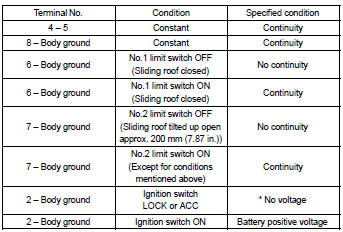
* Exceptions:
For 60 seconds after the ignition switch on → off (acc) or until the driver or passenger door is opened after the ignition switch on → off (acc).
If the result is not as specified, replace the relay.
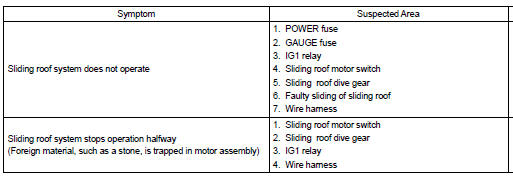
Problem symptoms table


Other materials:
No sound is heard from speaker in all modes
Wiring diagram
Inspection procedure
1 Check lcd (liquid crystal display) for lighting
Lcd illumination check
turn the ignition switch acc.
Turn the radio receiver assembly on.
Standard: lcd illumination of the radio receiver assembly light.
2 Control fader and ...
Entire combination meter does not operate
Wiring diagram
Inspection procedere
1 Check fuse
Check that continuity exists of dome fuse.
check that continuity exists of gauge fuse.
check that continuity exists of am1 fuse.
2 Inspect combination meter assy
Check continuity.
Disconnect the ” ...
Replacement
Hint:
installation is according to the reverse order of the removal.
1. Remove fr wiper arm rh
2. Remove fr wiper arm lh
3. Remove hood to cowl top seal
4. Remove cowl top ventilator louver lh
5. Remove cowl top ventilator louver rh
6. Remove front door weatherstrip rh
7. Remove front ...