
Toyota Corolla (E120): Inspection
1. Inspect sliding roof limit switch
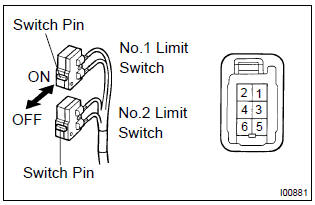
- Inspect the sliding roof limit switch continuity.
Standard:
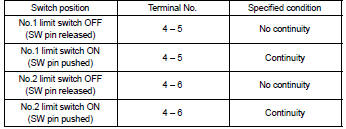
If the continuity is not as specified, replace the switch.
2. Inspect sliding roof drive gear sub–assy
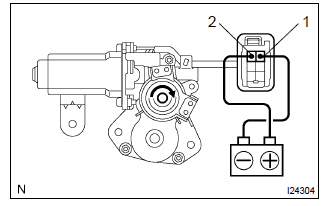
- Connect the positive (+) lead from the battery to terminal 2 and the negative (–) lead to terminal 1, and check that the motor turns clockwise (moves to the close side).
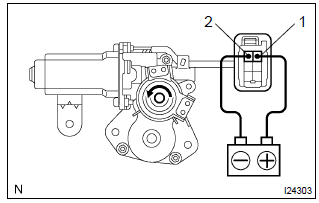
- Reverse the polarity, check that the motor turns counterclockwise (moves to the open side).
If the operation is not as specified, replace the motor.
3. Inspect sliding roof motor circuit breaker
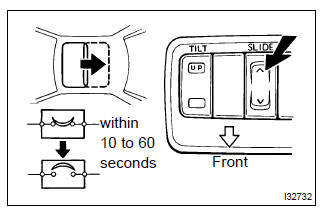
- With the sliding roof in the fully opened position, hold the sliding roof switch in the ”open” side and check that there is circuit breaker operating noise within 10 to 60 seconds.
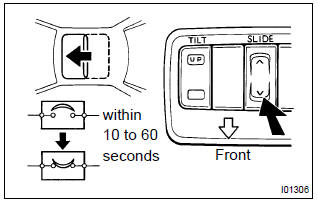
- With the sliding roof in the fully opened position, hold the sliding roof switch in the ”close” side and check that the sliding roof begins to close within 60 seconds.
If the operation is not as specified, replace the motor.
4. Inspect power main relay
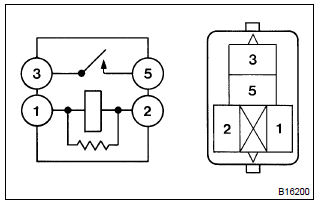
- Remove the power window relay from the instrument panel j/b.
- inspect the power window relay.
Standard:
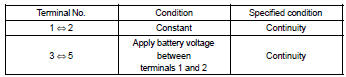
If the result is not as specified, replace the relay.


Other materials:
Terminals of ecu
1. Inspect tvip ecu
Inspect the ecu–b, dome and ecu–ig fuses.
disconnect the tvip ecu connector, and the continuity and voltage of
check each terminal of the disconnected
connector.
Standard:
If the result is not as specified, the vehicle’s side may malfunction.
Reco ...
Moon roof
Use the overhead switches to open and close the moon roof and tilt it up and
down.
■ Opening and closing
1 Opens the moon roof* The moon roof stops slightly before the fully open position
to reduce wind noise.
Press the switch again to fully open the moon roof.
2 Closes the moon roof*
...
Key information
Keys
The following keys are provided with the vehicle.
► Vehicles without a smart key system
(type A)
1 Keys
2 Key number plate
► Vehicles without a smart key system (type
B)
1 Keys
Operating the wireless remote control function
2 Key number plate
► Vehicles ...