
Toyota Corolla (E120) 2002–2008 Repair Manual / Windshield/windowglass/mirror / Power window control system / On–vehicle inspection
Toyota Corolla (E120): On–vehicle inspection
1. Check basic function (manual operation function)
- turn the ignition switch on.
- Check that the door glass moves up when each window switch of the regulator master switch assembly is turned up and moves down when each window switch is turned down.
- Check that the door glass moves up when the window switch of each regulator switch assembly is turned up and moves down when the window switch is turned down.
- Check that the other door glasses than the driver’s door glass do not operate when the window lock switch is turned lock.
2. Check automatic operation function
- turn the ignition switch on.
- Check that the auto down operates and the door glass is fully opened when each window switch of the regulator master switch assembly is turned down by double–shift.
- Check that the auto down operates and the door glass is fully opened when the window switch of each regulator switch assembly is turned down by double–shift.
- Check that the door glass stops when the applicable switch is turned up during the auto down operation. (However, if the switch is kept in the up side, the window will transfer to the manual operation.)
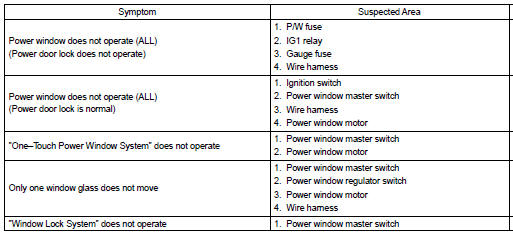
Problem symptoms table


Other materials:
Check mode procedure
Hint:
hand–held tester only:
compared to the normal mode, the check mode has more sensing
ability to detect malfunctions. Furthermore, the same diagnostic
items which are detected in the normal mode can also be
detected in the check mode.
1. Check mode procedure(using the hand–held tester) ...
Problem symptoms table
Hint:
use the table below to help determine the cause of the problem. The numbers
indicate the priority of the
likely cause of the problem. Check each part in order. If necessary, replace
these parts.
1. Headlamp and tail lamp
2. Front fog lamp system
3. Turn signal and hazard warni ...
Circuit inspection
1 Check d squib circuit(airbag sensor assy center – horn button
assy)
Disconnect the negative (–) terminal cable from the battery,
and wait at least for 90 seconds.
disconnect the connectors between the airbag sensor
assy center and the horn button assy.
connect the ...