
Toyota Corolla (E120) 2002–2008 Repair Manual / Diagnostics / Combination meter / Malfunction in speedometer
Toyota Corolla (E120): Malfunction in speedometer
Wiring diagram
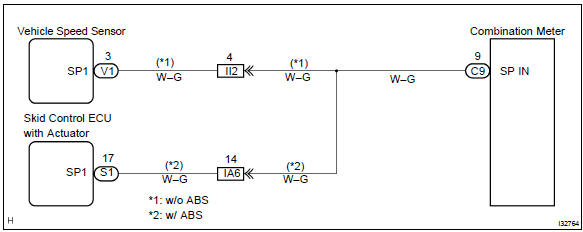
Inspection procedure
1 Check combination meter assy
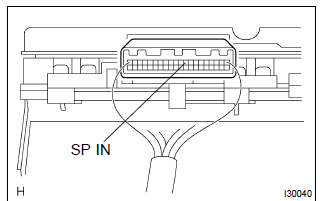
- Remove the combination meter assy with connector still connected.
- check voltage.
- Jack up either of the front wheels.
- Shift the shift lever to neutral.
- Turn the ignition switch to on.
- Measure the voltage between terminals c9–9 of combination meter assy and body ground when front wheel is turning slowly.
Standard voltage: voltage is generated intermittently.
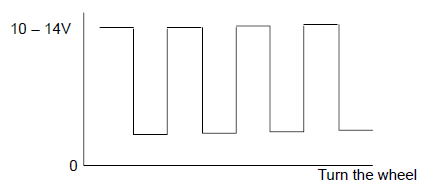
Result:



Check and replace combination meter assy
2 Check obd ii scan tool or hand–held tester
- Check output value of skid control ecu.
- Connect the hand–held tester to dlc3.
- Turn the ignition switch to on and push the hand–held tester main switch on.
- Select the data list mode on the hand–held tester.
- Check that there is no difference between the speed value output
from the speed sensor displayed
by the hand–held tester and the speed value displayed by the speedometer
when driving
the vehicle.
Ok: there is almost no difference from the displayed speed value.


Repair or replace harness or connector
3 Inspect speedometer sensor
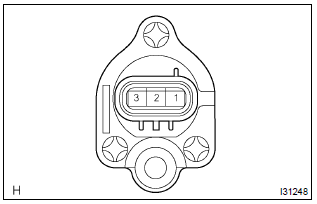
- Check voltage.
- Shift the shift lever to neutral.
- Jack up either of the front wheel.
- Turn the ignition switch to on.
- Measure voltage between terminals 3 and 2 of speed sensor when the front wheel is turning slowly.
Standard voltage: voltage is generated intermittently.
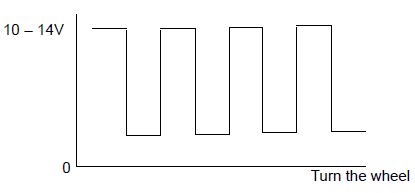


Repair or replace harness or connector


Other materials:
Engine coolant
The coolant level is satisfactory if it is between the “F” and “L” lines on the
reservoir when the engine is cold.
1 Reservoir cap
2 “F” line
3 “L” line
If the level is on or below the “L” line, add coolant up to the “F” line.
■Coolant selection
Only use “To ...
General information
1. Basic dimensions
(a) there are two types of dimensions in the diagram.
(1) (Three-dimensional distance)
straight-line distance between the centers of two
measuring points.
(2) (Two-dimensional distance)
horizontal distance in forward/rearward direction
between the centers o ...
Vehicle information
This screen can be used to display the fuel consumption.
“Trip Information” or “Past Record” screen
Press “CAR” to display the “Trip Information” or “Past Record” screen.
Fuel consumption
■ Trip information
If the “Trip Information” screen does not appear, select â ...