
Toyota Corolla (E120): Inspection procedure
1 Check connector
- Disconnect the negative (–) terminal cable from the battery, and wait at least for 90 seconds.
- check the connection of the combination meter connector and the
airbag sensor assy center connectors.
Ok: the connectors are connected.


2 Check combination meter assy
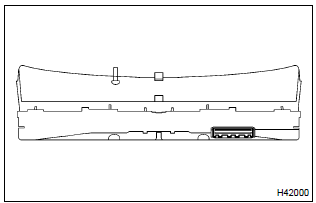
- Disconnect the connector from the combination meter.
- connect the negative (–) terminal cable to the battery, and wait at least for 2 seconds.
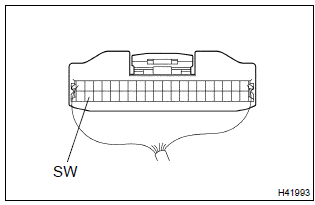
- Turn the ignition switch to on, and wait at least for 6 seconds.
- measure the voltage between sw and body ground.
Ok: voltage: above 8 v


3 Check instrument panel wire(airbag sensor assy center–combination meter assy)
- Turn the ignition switch to lock.
- disconnect the negative (–) terminal cable from the battery, and wait at least for 90 seconds.
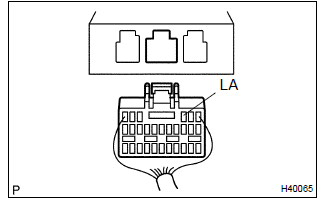
- disconnect the connector from the airbag sensor assy center.
- measure the resistance between la and body ground.
Ok: resistance: 1mΩ or higher


Replace air bag sensor assy center
4 Check instrument panel wire(airbag sensor assy center–combination meter assy)
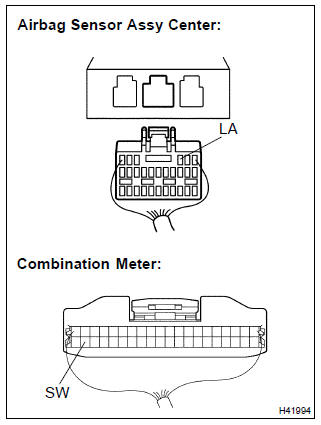
- For the connector (on the airbag sensor assy center side)
between the combination meter and the airbag sensor
assy center, measure the resistance between sw and
la.
Ok: resistance: below 1 Ω


Replace air bag sensor assy center

 Srs warning light circuit malfunction (does not light
up, when ignition switch is turned to on)
Srs warning light circuit malfunction (does not light
up, when ignition switch is turned to on)
Other materials:
Update contacts from phone
Operation methods differ between PBAP compatible and PBAP incompatible but OPP
compatible Bluetooth® phones.
If your cellular phone is neither PBAP nor OPP compatible, the contacts cannot
be transferred.
■ For PBAP Compatible Bluetooth® Phones
1 Select “Update Contacts from Phone” ...
Trunk
The trunk can be opened
using the trunk opener,
entry function or wireless
remote control or key.
WARNING
Observe the following precautions.
Failure to do so may result in
death or serious injury.
■Before driving
Make sure that the trunk lid is
fully closed. If the trunk lid is not
fully clos ...
Overhaul
1. Remove speedometer drive (mtm) gear
Remove the speedometer drive (mtm) gear from the front
differential case.
2. Remove front differential ring gear
Place matchmarks on the front differential ring gear and
front differential case.
Remove the 8 bolts. Using a hamme ...