
Toyota Corolla (E170) 2014–2019 Owners Manual / Interior features / Bluetooth® phone (Multimedia system) / What to do if... (Troubleshooting)
Toyota Corolla (E170): What to do if... (Troubleshooting)
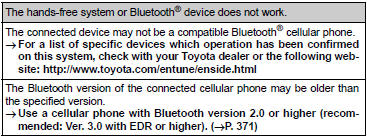
If there is a problem with the hands-free system or a Bluetooth® device, first check the table below.
► When using the hands-free system with a Bluetooth® device
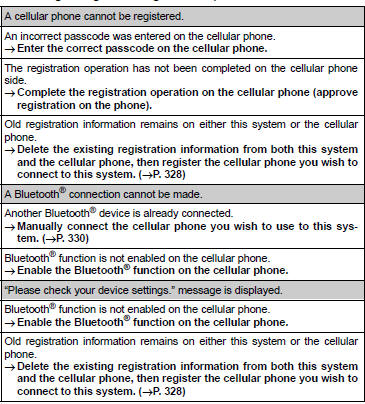
► When registering/connecting a cellular phone
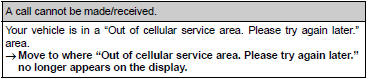
► When making/receiving a call
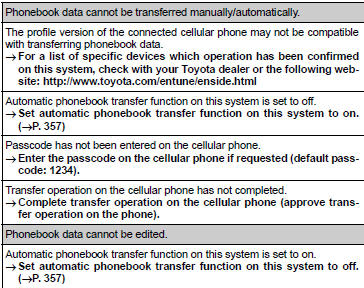
► When using the phonebook
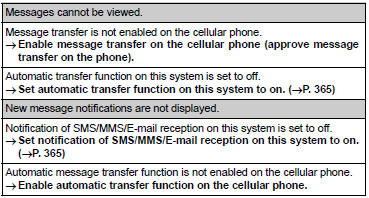
► When using the Bluetooth® message function
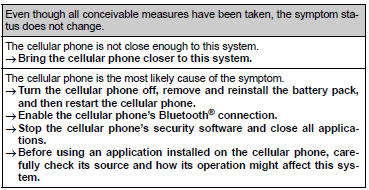
► In other situations


Other materials:
Circuit description
In the diagram below, when the engine is cranked, current flows from terminal
st2 of the ignition switch to
the starter relay coil and also current flows to terminal sta of the ecm (sta
signal).
When the sta signal and ne signal are input to the ecm, tr is turned on, current
flows to the c ...
On–vehicle inspection
1. Washer motor
Operation check
pour the water into the washer jar with the washer
motor and the pump installed to the washer jar assy.
Connect the battery (+) to terminal 2 of the washer
motor and the pump, the battery (–) to terminal 1 of
the washer motor and the pump ...
Circuit description
The shift solenoid valve sl is turned ”on” and ”off” by signals from the ecm
in order to control the hydraulic
pressure operation, the lock–up relay valve, which then the controls operation
of the lock–up clutch.
Fail safe function:
if the ecm detects a malfunction, it turns the ...