
Toyota Corolla (E120) 2002–2008 Repair Manual / Diagnostics / Electronic controlled automatic transaxle / Shift solenoid ”a” performance
(shift solenoid valve s1)
Toyota Corolla (E120): Shift solenoid ”a” performance (shift solenoid valve s1)
Dtc p0751 shift solenoid ”a” performance (shift solenoid valve s1)
System description
The ecm uses signals from the vehicle speed sensor and crankshaft position sensor to detect the actual gear position (1st, 2nd, 3rd or o/d gear).
Then the ecm compares the actual gear with the shift schedule in the ecm memory to detect the mechanical trouble of the shift solenoid valves, the valve body or automatic transaxle (clutch, brake or gear etc.).

Monitor description
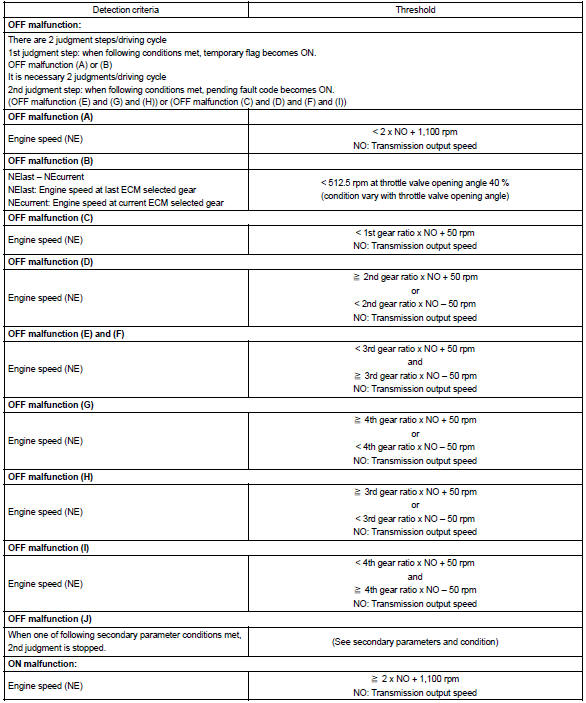
The ecm commands gear shifts by turning the shift solenoid valves ”on/off”. According to the input shaft revolution, intermediate (counter) shaft revolution and output shaft revolution, the ecm detects the actual gear position (1st, 2nd, 3rd or o/d gear position). When the gear position commanded by the ecm and the actual gear position are not same, the ecm illuminates the mil.
Monitor strategy
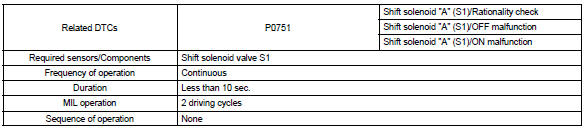
Typical enabling conditions
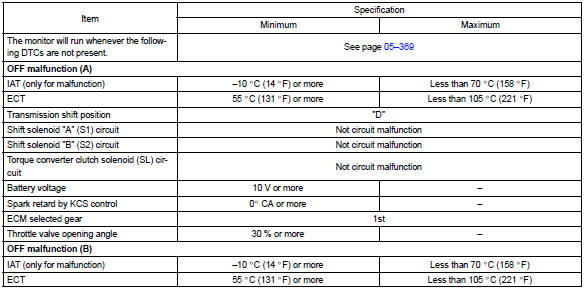
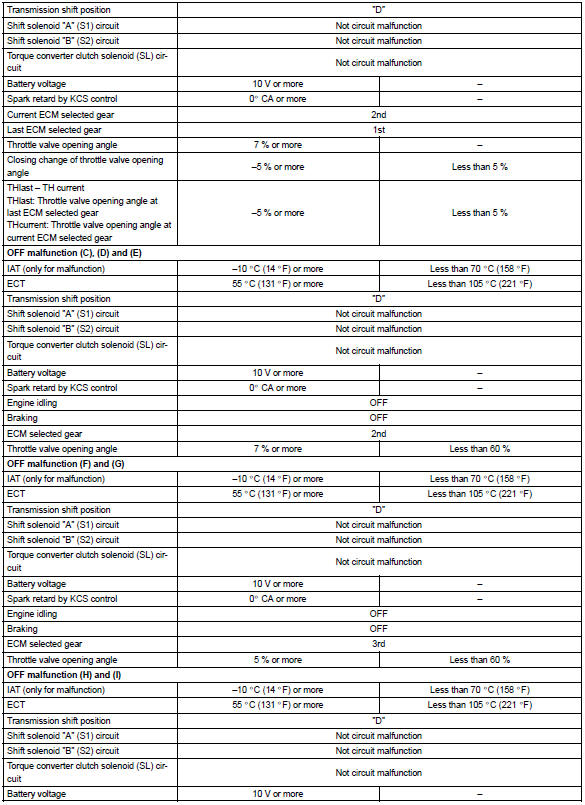
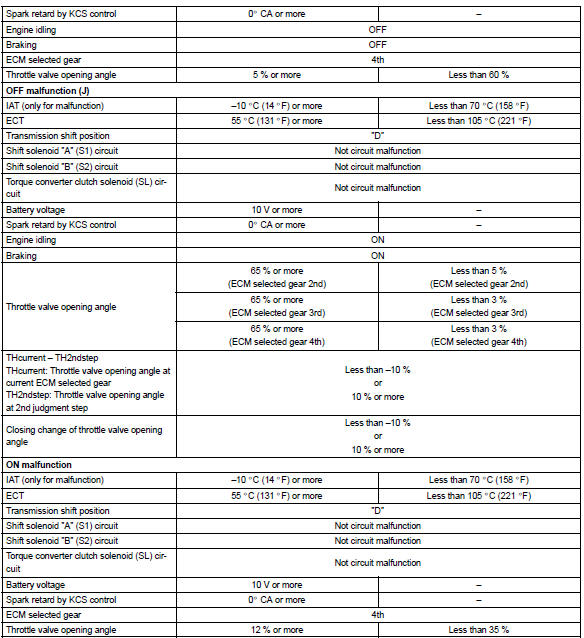
Typical malfunction thresholds


Other materials:
Bluetooth® Audio (Multimedia system)
Listening to Bluetooth® Audio
The Bluetooth® audio system enables the user to enjoy music played on a portable
player from the vehicle speakers via wireless communication.
When a Bluetooth® device cannot be connected, check the connection status on
the “Bluetooth* Audio” screen. If the ...
USB charging port (if
equipped)
The USB charging port are used
to supply 3.0 A of electricity at 5
V to external devices.
The USB charging port are for
charging only. They are not
designed for data transfer or
other purposes.
Depending on the external
device, it may not charge properly.
Refer to the manual
included with the dev ...
Sound setting
1 Display the “Phone/Message Settings” screen. 2 Select “Sound Settings” on the
“Phone/Message Settings” screen.
1 Set the desired ringtone.
2 Adjust the ringtone volume.
3 Adjust the message readout volume.
4 Set the desired incoming SMS/MMS tone.
5 Adjust the incoming SMS/ MMS t ...