
Toyota Corolla (E120) 2002–2008 Repair Manual / Engine hood/door / Luggage door hinge torsion bar rh
Toyota Corolla (E120): Luggage door hinge torsion bar rh
Replacement
Hint
:
- installation is in the reverse order of the removal. But the installation is indicated only when it has a point.
- In the lh side, work in the same procedure as in the rh side.
- Since the removal of the torsion bar will cause no tension, operation of opening and closing the door should be carried out holding the door by hand in order to prevent the door from closing without any resistance.
- Rh side torsion bar is in the upper side and lh side torsion bar is in the lower side, thus the installation should be done in the order of rh to lh, and the removal should be done in the order of lh to rh.
1. Remove luggage door hinge torsion bar rh
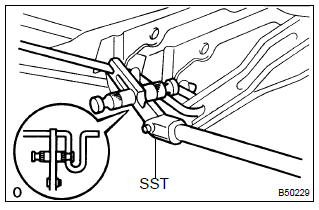
- Remove the torsion bars from the center bracket.
- install sst to the torsion bar on the hinge side.
Sst 09804–24010
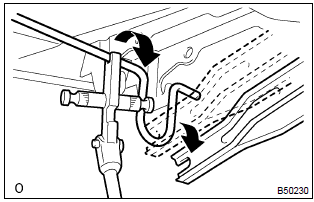
- Push down the sst, and pull the luggage compartment door hinge from the torsion bar.
- slowly lift the sst, and remove the torsion bar from the torsion bar bracket with sst.
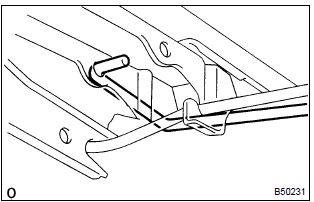
- Disconnect the torsion bar from the bracket.
- employ the same manner described above to the other side.
2. Install luggage door hinge torsion bar rh
- when installing the torsion bar, be sure to install it to the clamp securely.


Other materials:
Source voltage drop
The srs is equipped with a voltage–increase circuit (dc–dc converter) in the
airbag sensor assy center
in case the source voltage drops.
When the battery voltage drops, the voltage–increase circuit (dc–dc converter)
functions to increase the
voltage of the srs to normal voltage.
...
Fuel pump shut off system
To minimize the risk of fuel leakage when the engine stalls or when an airbag
inflates upon collision, the fuel pump shut off system stops the supply of fuel
to the engine.
Follow the procedure below to restart the engine after the system is activated.
► Vehicles without a smart key syst ...
Air conditioning filter
The air conditioning filter must be changed regularly to maintain air conditioning
efficiency.
Removal method
1Turn the engine switch off.
2 Open the glove box. Slide off the damper.
3 Push in the glove box on the vehicle’s outer side to disconnect the claws.
Then pull out the glove box ...