
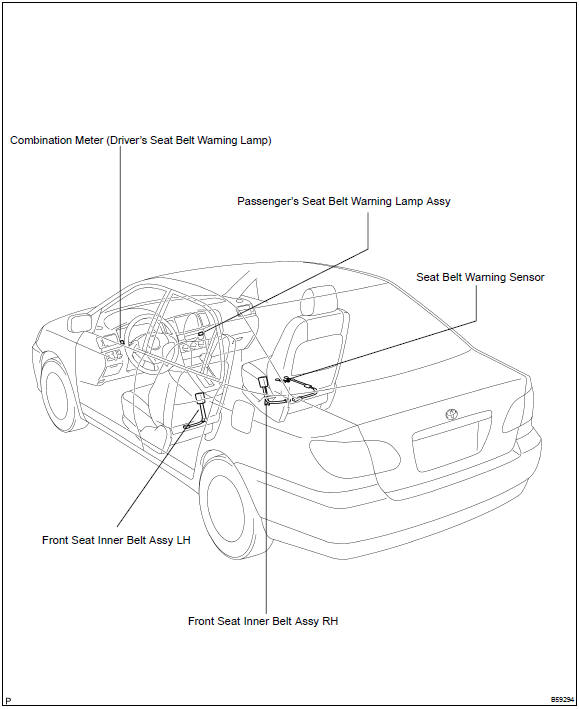
Toyota Corolla (E120): Location
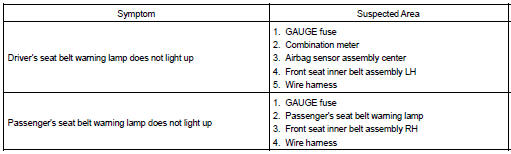
Problem symptoms table


Other materials:
Inspection procedure
Hint:
hand–held tester only:
narrowing down the trouble area is possible by performing ”a/f control” active
test (heated oxygen
sensor or other trouble areas can be distinguished).
perform active test using hand–held tester (a/f control).
Hint:
”a/f control” is the act ...
Menu list of the Bluetooth® audio/phone
To enter a menu, press and navigate
menus by using :
*: Bluetooth is a registered trademark of Bluetooth SIG, Inc.
■Bluetooth® audio/phone system functions
Depending on the Bluetooth® device, certain functions may not be available. ...
Replacement
Hint: components:
1. Precaution
2. Disconnect battery negative terminal
3. Remove instrument panel sub–assy lower
Remove the screw from the glove compartment door
stopper sub–assy.
pull the instrument panel sub–assy lower to remove it.
4. Separate passenger airbag co ...