
Toyota Corolla (E210) 2019-2026 Owners Manual / For safety and security / Child safety / Using an anchor bracket
(for top tether strap)
(except for Puerto Rico)
Toyota Corolla (E210): Using an anchor bracket (for top tether strap) (except for Puerto Rico)
■ Anchor brackets (for top tether strap)
Anchor brackets are provided for each rear seat.
Use anchor brackets when fixing the top tether strap.
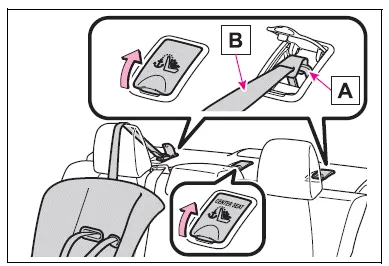
- Anchor brackets
- Top tether strap
■ Fixing the top tether strap to the anchor bracket
Install the child restraint system in accordance to the operation manual enclosed with the child restraint system.
Rear outboard seats
Open the anchor bracket cover, latch the hook onto the anchor bracket and tighten the top tether strap.
Make sure the top tether strap is securely latched.
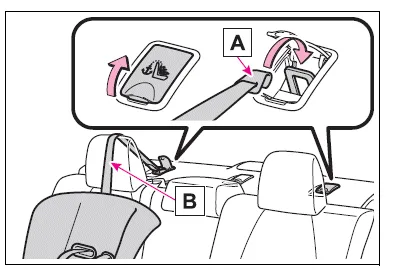
- Hook
- Top tether strap
Rear center seat
Latch the hook onto the anchor bracket and tighten the top tether strap.
Make sure the top tether strap is securely latched.
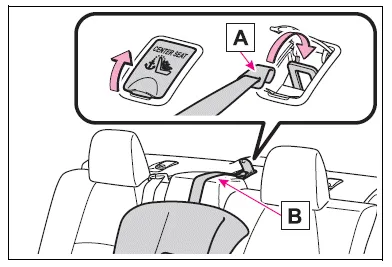
- Hook
- Top tether strap
■Laws and regulations pertaining to anchors
The LATCH system conforms to FMVSS225 or CMVSS210.2.
Child restraint systems conforming to FMVSS213 or CMVSS213 specifications can be used.
This vehicle is designed to conform to SAE J1819.
WARNING
■When installing a child restraint system
Observe the following precautions.
Failure to do so may result in death or serious injury.
- Firmly attach the top tether strap and make sure that the belt is not twisted.
- Do not attach the top tether strap to anything other than the anchor bracket.
- After securing a child restraint system, never adjust the seat.
- Follow all installation instructions provided by the child restraint system manufacturer.
NOTICE
■Anchor brackets (for top tether strap)
When not in use, make certain to close the lid. If it remains open, the lid may be damaged.


Other materials:
Rear suspension
Service data
Torque specification
Tire&wheel
Service data
Drive shaft / propeller shaft / axle
Service data
Torque specification
...
Circuit description
The airbag front rh sensor circuit consists of the airbag sensor assy center
and airbag front rh sensor.
Dtc b1156/b1157/15 is recorded when a malfunction is detected in the airbag
front rh sensor circuit.
Wiring diagram
...
Circuit description
The intake air temperature (iat) sensor, mounted on the mass
air flow (maf) sensor, monitors the intake air temperature. The
iat sensor has a thermistor that varies its resistance depending
on the temperature of the intake air. When the air temperature
is low, the resistance in the thermisto ...