
Toyota Corolla (E120) 2002–2008 Repair Manual / Diagnostics / Supplemental restraint system / Short in side squib (rh) circuit / Inspection procedure
Toyota Corolla (E120): Inspection procedure
1 Check side squib(rh) circuit(airbag sensor assy center – front seat airbag assy rh)
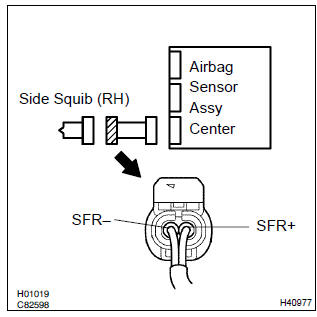
- Disconnect the negative (–) terminal cable from the battery, and wait at least for 90 seconds.
- disconnect the connectors between the front seat airbag assy (rh) and the airbag sensor assy center.
- release the airbag activation prevention mechanism of the connector (on the airbag sensor assy center side) between the airbag sensor assy center and the front seat airbag assy (rh) .
- for the connector (on the front seat airbag assy side) between
the airbag sensor assy center and the front seat
airbag assy (rh), measure the resistance between sfr+
and sfr–.
Ok: resistance: 1 mw or higher


2 Check air bag sensor assy center
Sst 09843–18040
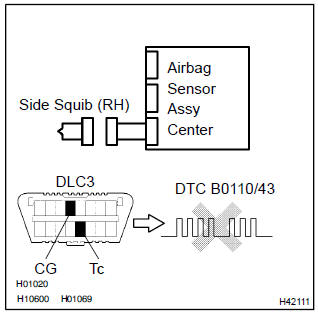
- Connect the the connector to the airbag sensor assy center.
- connect the negative (–) terminal cable to the battery, and wait at least for 2 seconds.
- turn the ignition switch to on, and wait at least for 20 seconds.
- clear the dtc stored in memory .
- turn the ignition switch to lock, and wait at least for 20 seconds.
- turn the ignition switch to on, and wait at least for 20 seconds.
- check the dtc .
Ok: dtc b0110/43 is not output.
Hint
: codes other than code b0110/43 may be output at this time, but they are not relevant to this check.


3 Check side squib(rh)
Sst 09843–18040
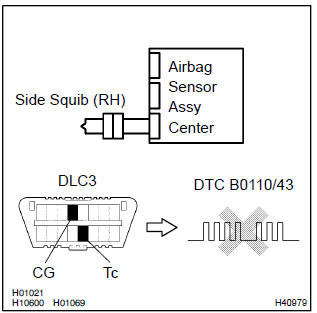
- Turn the ignition switch to lock.
- disconnect the negative (–) terminal cable from the battery, and wait at least for 90 seconds.
- connect the front seat airbag assy (rh) connector.
- connect the negative (–) terminal cable to the battery, and wait at least for 2 seconds.
- turn the ignition switch to on, and wait at least for 20 seconds.
- clear the dtc stored in memory .
- turn the ignition switch to lock, and wait at least for 20 seconds.
- turn the ignition switch to on, and wait at least for 20 seconds.
- check the dtc .
Ok: dtc b0110/43 is not output.
Hint
: codes other than code b0110/43 may be output at this time, but they are not relevant to this check.


Use simulation method to check


Other materials:
Inspection procedure
1 Inspect stop lamp switch assy
Check that the stop light lights up when brake pedal is depressed and
turns off when the brake pedal
is released.
2 Inspect skid control ecu terminal voltage(stp terminal)
Disconnect skid control ecu connector.
measure voltage between termina ...
Circuit description
The srs warning light is located on the combination meter.
When the srs is normal, the srs warning light lights up for approx. 6 Seconds
after the ignition switch is
turned from the lock position to on position, and then turns off automatically.
If there is a malfunction in the srs, the srs ...
Folding the mirrors
Push the mirror back in the direction of the vehicle’s rear.
■Mirror angle can be adjusted when
► Vehicles without a smart key system
The engine switch is in the “ACC” or “ON” position.
►Vehicles with a smart key system
The engine switch is in ACCESSORY or IGNITION ...