
Toyota Corolla (E120): Inspection procedure
1 Check p squib circuit(airbag sensor assy center – instrument panel passenger airbag assy)
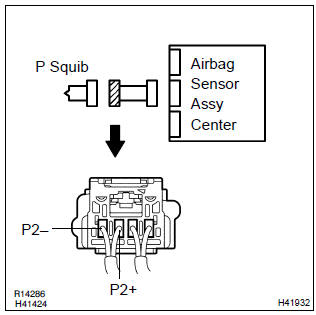
- Disconnect the negative (–) terminal cable from the battery, and wait at least for 90 seconds.
- disconnect the connector between the airbag sensor assy center and the instrument panel passenger airbag assy.
- for the connector (on the instrument panel passenger airbag
assy side) between the airbag sensor assy center
and the instrument panel passenger airbag assy, measure
the resistance between p2+ and body ground.
Ok: resistance: 1 mΩ or higher


2 Check air bag sensor assy center
Sst 09843–18040
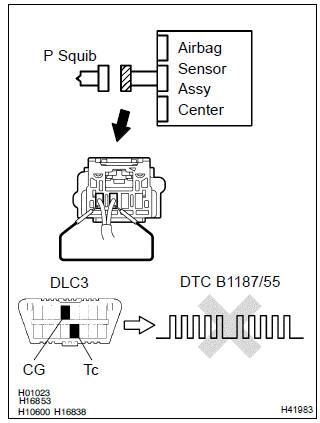
- Connect the connector to the airbag sensor assy center.
- using a service wire, connect p2+ and p2– of the connector (on the instrument panel passenger airbag assy side) between the airbag sensor assy center and the instrument panel passenger airbag assy.
- connect the negative (–) terminal cable to the battery, and wait at least for 2 seconds.
- turn the ignition switch to on, and wait at least for 20 seconds.
- clear the dtc stored in memory .
- turn the ignition switch to lock, and wait at least for 20 seconds.
- turn the ignition switch to on, and wait at least for 20 seconds.
- check the dtc .
Ok: dtc b1187/55 is not output.
Hint
: codes other than code b1187/55 may be output at this time, but they are not relevant to this check.


3 Check p squib
Sst 09843–18040
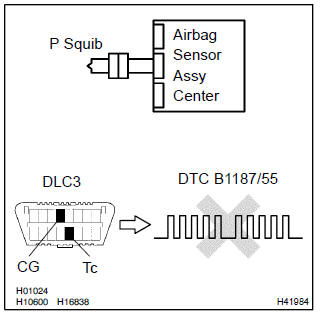
- Turn the ignition switch to lock.
- disconnect the negative (–) terminal cable from the battery, and wait at least for 90 seconds.
- connect the instrument panel passenger airbag assy connector.
- connect the negative (–) terminal cable to the battery, and wait at least for 2 seconds.
- turn the ignition switch to on, and wait at least for 20 seconds.
- clear the dtc stored in memory .
- turn the ignition switch to lock, and wait at least for 20 seconds.
- turn the ignition switch to on, and wait at least for 20 seconds.
- check the dtc .
Ok: dtc b1187/55 is not output.
Hint
: codes other than code b1187/55 may be output at this time, but they are not relevant to this check.


4 Use simulation method to check


Replace all srs components including the wire harness


Other materials:
Adjusting the set speed
To change the set speed, operate the lever until the desired set speed is obtained.
1 Increases the speed
2 Decreases the speed
Fine adjustment: Momentarily move the lever in the desired direction.
Large adjustment: Hold the lever in the desired direction.
The set speed will be increased or dec ...
Bluetooth® phone message function
Received messages can be forwarded from the connected Bluetooth® phone, enabling
checking and replying using the multimedia system.
Depending on the type of Bluetooth® phone connected, received messages may not
be transferred to the message inbox.
If the phone does not support the message fu ...
Toyota vehicle intrusion protection system
On–vehicle inspection
1. Outline of toyota vehicle intrusion protection (tvip) system
Hint:
the theft deterrent system has 2 modes; one is the active mode that is an
initially set mode and another is
the passive mode that can be switched on/off by the specified method (see step
4).
&nb ...