
Toyota Corolla (E120): Inspection procedure
1 Inspect transmission wire(slt)
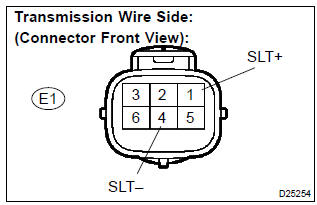
- Disconnect the transmission wire connector from the transaxle.
- measure the resistance according to the value(s) in the table below.
Standard:

- Measure the resistance according to the value(s) in the
table below.
Standard (check for short):



2 Check harness and connector(transmission wire – ecm)
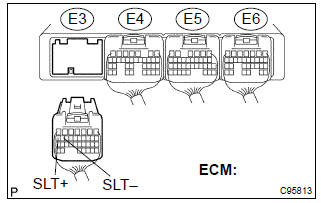
- Connect the transmission wire connector to the transaxle.
- disconnect the ecm connector.
- measure the resistance according to the value(s) in the table below.
Standard:

- Measure the resistance according to the value(s) in the table below.
Standard (check for short):



Replace ecm
3 Inspect shift solenoid valve(slt)
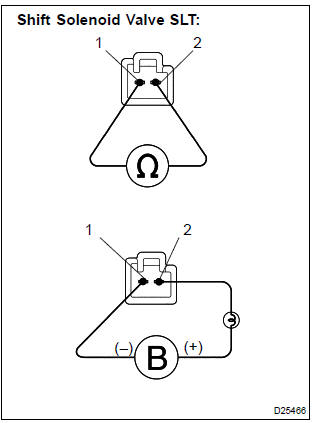
- Remove the shift solenoid valve (slt).
- measure the resistance according to the value(s) in the table below.
Standard:

- Connect the positive (+) battery lead with a 21 w bulb to the terminal 2 of the solenoid valve connector and the negative (–) battery lead to the terminal 1 of the solenoid valve connector for checking the solenoid valve operation.
Standard: the solenoid makes an operating noise.


Repair or replace transmission wire


Other materials:
Keys
The following keys are provided
with the vehicle.
Type A
Keys (without a wireless
remote control function)
Key number plate
Type B
Keys (with a wireless remote
control function)
Operating the wireless remote control
function
Key number plate
Type C
Electronic keys
Operating the sm ...
Antenna cord sub–assy
Replacement
Hint: components:
1. Remove instrument panel sub–assy upper
Hint:
refer to the procedure until the step, ”remove instrument panel sub–assy
upper” of
instrument panel sub–assy lower.
Remove the related parts as long as the antenna cord sub–assy can be
removed ...
Power point socket assy
Replacement
Hint: components:
1. Remove floor shift shift lever knob sub–assy (m/t transaxle)
2. Remove console panel upper
3. Remove power point socket assy
Turn the socket in the circumference direction as shown
the illustration, disengage the claw between the socket
and the pow ...