
Toyota Corolla (E170) 2014–2019 Owners Manual / Interior features / Using the air conditioning system and defogger / Automatic air conditioning system / Air conditioning controls
Toyota Corolla (E170): Air conditioning controls
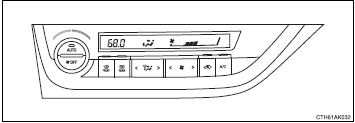
■ Adjusting the temperature setting
To adjust the temperature setting, turn
 clockwise to increase the temperature
and turn
clockwise to increase the temperature
and turn  counterclockwise to decrease
the temperature.
counterclockwise to decrease
the temperature.
■ Fan speed setting
Press “>” on  to increase the fan
speed.
to increase the fan
speed.
Press “<” on  to decrease the fan speed.
■ Change the airflow mode
To change the airflow, press “<” or “>” on
 .
.
The air outlets used are switched each time either side of the button is pressed.
■ Other functions
● Switching between outside air and recirculated air modes ● Defogging the windshield ● Defogging the rear window and outside rear view mirrors


Other materials:
Inspection procedure
1 Check source voltage
Measure the voltage of the battery.
Ok:
voltage: 10 – 14 v
2 Check air bag sensor assy center
Disconnect the negative (–) terminal cable from the battery, and wait at
least for 90 seconds.
disconnect the connectors from the airbag sensor assy ...
Front no.1 Speaker assy
Replacement
Hhint: components:
1. Remove front armrest assy lh
2. Remove power window regulator master switch assy (w/ power window)
3. Remove front armrest base panel upper lh (w/o power window)
4. Remove front door window regulator handle assy (w/o power window)
5. Remove front door lowe ...
Toyota Safety Sense 3.0 software
update
It is necessary to enter a
connected services contract,
provided by Toyota, to
use these functions. For
details, contact your Toyota
dealer.
WARNING
■For safe use
When the Toyota Safety Sense
3.0 software is updated, the operating
methods of functions may
change. Using this system without
knowing ...