
Toyota Corolla (E120) 2002–2008 Repair Manual / Diagnostics / Sfi system / System voltage / Inspection procedure
Toyota Corolla (E120): Inspection procedure
Hint
: read freeze frame data using the hand-held tester or the obd ii scan tool. Freeze frame data records the engine conditions when a malfunction is detected. When troubleshooting, it is useful for determining whether the vehicle was running or stopped, the engine was warmed up or not, the air–fuel ratio was lean or rich, etc. At the time of the malfunction.
1 Check fuse(efi fuse)
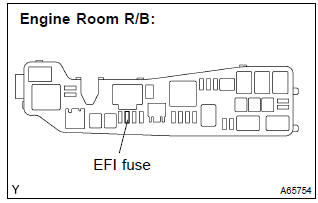
- Remove the efi fuse from the engine room r/b.
- check for continuity in the efi fuse.
Standard: continuity
- reinstall the efi fuse.


2 Inspect ecm(batt voltage)
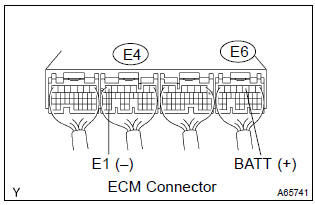
- Measure the voltage between the terminals of the e4 and e6 ecm connectors.
Standard:



3 Check harness and connector(ecm – efi fuse, efi fuse – battery)
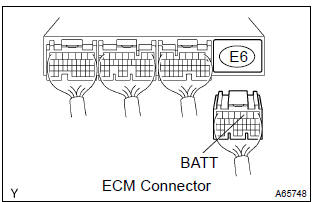
- Check the harness and the connector between the efi fuse and ecm.
- Remove the efi fuse from the engine room r/b.
- Disconnect the e6 ecm connector.
- Check the resistance between the wire harness side connectors.
Standard (check for open):

Standard (check for short):

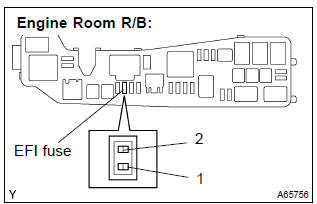
- Reconnect the ecm connector.
- Reinstall the efi fuse.
- check the harness and the connector between the efi fuse and battery.
- Remove the efi fuse from the engine room r/b.
- Disconnect the battery positive terminal.
- Check the resistance between the wire harness side connectors.
Standard (check for open):

Standard (check for short):

- Reconnect the battery positive terminal.
- Reinstall the efi fuse.


Check and replace engine room relay block assy


Other materials:
Deleting a registered phone number
1 Select “Delete contacts” using .
2 Select the desired phone number using
and press
(YES).
To delete all of the registered phone numbers, select “All delete” using
and press
(YES). ...
Switches
Instrument panel light control dial
Automatic High Beam switch
Heated steering wheel switch*
Windshield wiper de-icer switch*
Outside rear view mirror switch
Door lock switches
Power window switches
Window lock switch
*: If equipped
Meter control switches
Paddle shift switches*1
C ...
Circuit description
The park/neutral position switch detects the shift lever position and sends
signals to the ecm.
Monitor description
The park/neutral position switch detects the gearshift position and sends a
signal to the ecm.
For security, the park/neutral position switch detects the gearshift positio ...