
Toyota Corolla (E120) 2002–2008 Repair Manual / Diagnostics / Sfi system / Engine coolant temperature circuit / Circuit description
Toyota Corolla (E120): Circuit description
A thermistor is built in the engine coolant temperature sensor and changes the resistance value according to the engine coolant temperature.
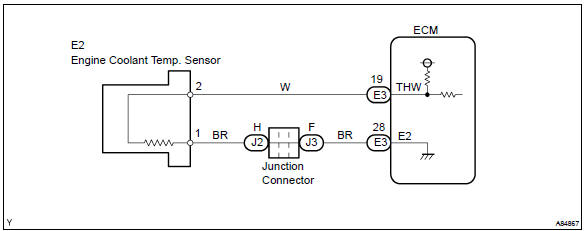
The structure of the sensor and connection to the ecm is the same as those of the intake air temperature sensor.
Hint
: if the ecm detects the dtc p0115, p0117 or p0118, it operates the fail–safe function in which the engine coolant temperature is assumed to be 80 c (176 °F).
|
Dtc no. |
Proceed to |
Dtc detection condition |
Trouble area |
| P0115 | Step 1 | Open or short in engine coolant temperature sensor circuit for 0.5 Seconds |
|
| P0117 | Step 4 | Short in engine coolant temperature sensor circuit for 0.5 Seconds | |
| P0118 | Step 2 | Open in engine coolant temperature sensor circuit for 0.5 Seconds |
Hint
: after confirming dtc p0115, p0117 or p0118, confirm the engine coolant temperature in the ”diagnosis/ enhanced obd ii/data list/all” using the hand–held tester or the obd ii scan tool.

Monitor description
The engine coolant temperature (ect) sensor is used to monitor the engine coolant temperature. The ect sensor has a thermistor that varies its resistance depending on the temperature of the engine coolant. When the coolant temperature is low, the resistance in the thermistor increases. When the temperature is high, the resistance drops. The variations in resistance are reflected in the voltage output from the sensor. The ecm monitors the sensor voltage and uses this value to calculate the engine coolant temperature. When the sensor output voltage deviates from the normal operating range, the ecm interprets this as a fault in the ect sensor and sets a dtc.
Example: when the ecm calculates that the ect is –40 c (–40 °F), or more than 140 c (284 °F), and if either the condition continues for 0.5 Sec or more, the ecm will set a dtc.
Monitor strategy
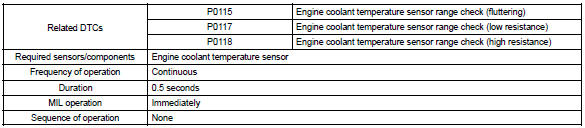
Typical enabling conditions

Typical malfunction thresholds
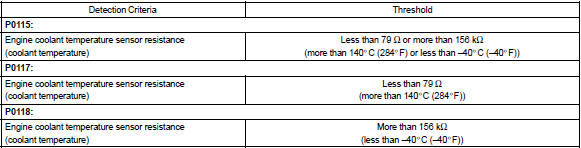
Component operating range

Wiring diagram


Other materials:
Power windows
Opening and closing the
power windows
The power windows can be
opened and closed using the
switches.
Operating the switch moves the
windows as follows:
Closing
One-touch closing*
Opening
One-touch opening*
*: To stop the window partway,
operate the switch in the opposite
direction.
■The po ...
Front axle lh hub bolt
Replacement
Hint: components:
1. Remove front wheel
2. Separate front disc brake caliper assy lh
3. Remove front disc
4. Remove front axle lh hub bolt
Using sst and a hammer handle or an equivalent, remove
the lh hub bolt.
Sst 09628–10011
5. Install front axle lh hub bolt
...
Anti-glare function
► Manual anti-glare inside rear view mirror
Reflected light from the headlights of vehicles behind can be reduced by operating
the lever.
1 Normal position
2 Anti-glare position
► Auto anti-glare inside rear view mirror
Responding to the level of brightness of the headlights of ...