
Toyota Corolla (E170) 2014–2019 Owners Manual / Instrument cluster / Gauges and meters (drive monitor display)
Toyota Corolla (E170): Gauges and meters (drive monitor display)
The displayed content may differ depending on the type of meter.
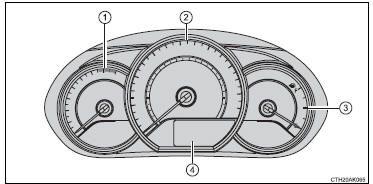
1 Tachometer
Displays the engine speed in revolutions per minute.
2 Speedometer
3 Fuel gauge
4 Drive monitor display
The drive monitor display presents the driver with a variety of drivingrelated data
including the current outside air temperature.
- Drive monitor display
- Instrument panel light control
- Trip information
- Eco Driving Indicator Light customization (except vehicles with a manual transmission)


Other materials:
Speed sensor front lh
Replacement
Hint:
replace the rh side by the same procedure as the lh side.
1. Remove front wheel
2. Remove front fender liner lh
3. Remove speed sensor front lh
Disconnect the speed sensor wire harness clamp from
the body.
disconnect the speed sensor connector.
Remo ...
Inspection
1. Spark plug
Notice:
never use a wire brush for cleaning.
Never attempt to adjust the electrode gap on used
spark plug.
Spark plug should be replaced every 192,000 km
(120,000 miles).
Clean the spark plugs.
Air pressure: below 588 kpa (6.0 Kg/cm2, 85 psi)
duration: 20 sec ...
Heater control & accessory assy
Replacement
1. Remove console panel upper
2. Remove instrument cluster finish panel
3. Remove heater control & accessory assy
Release the 2 fitting claws and pull out the heater control
& accessory assy.
Using a screwdriver, open the claw of the cable clamp and
dis ...