
Toyota Corolla (E170) 2014–2019 Owners Manual / Instrument cluster / Gauges and meters (drive monitor display) / Instrument panel light control
Toyota Corolla (E170): Instrument panel light control
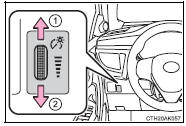
When the tail lights are on, the brightness of the instrument panel lights can be adjusted. (On vehicles with an automatic light control system, the instrument panel lights can be adjusted when the surrounding area is dark and the tail lights are on.) The brightness of the clock light can be adjusted regardless of whether the tail lights are on or off.
1 Brighter
2 Darker


Other materials:
Inspection procedure
Hint:
hand–held tester only:
narrowing down the trouble area is possible by performing ”a/f control” active
test (heated oxygen
sensor or other trouble areas can be distinguished). Perform active test using
hand–held tester (a/f
control).
Perform active test using the hand–held ...
Inspection procedure
Hint:
if different dtcs related to different systems that have terminal e2
as the ground terminal are output
simultaneously, terminal e2 may be open.
Read freeze frame data using the hand-held tester or the obd ii scan
tool. Freeze frame data records
the engine conditions when a malf ...
Inspection procedure
1 Check source voltage
Measure the voltage of the battery.
Ok:
voltage: 10 – 14 v
2 Check air bag sensor assy center
Disconnect the negative (–) terminal cable from the battery, and wait at
least for 90 seconds.
disconnect the connectors from the airbag sensor assy ...