
Toyota Corolla (E170): Front seats
Adjustment procedure
► Manual seat
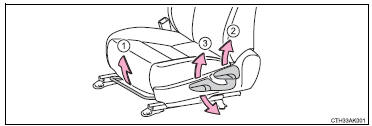
1 Seat position adjustment lever 2 Seatback angle adjustment lever 3 Vertical height adjustment lever (driver’s side only)
► Power seat (driver’s side only)
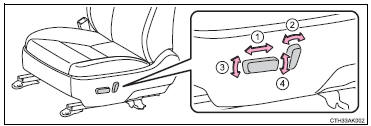
1 Seat position adjustment switch 2 Seatback angle adjustment switch 3 Seat cushion (front) angle adjustment switch 4 Vertical height adjustment switch
CAUTION
■Seat adjustment
●Be careful that the seat does not hit passengers or luggage.
●Do not recline the seat more than necessary when the vehicle is in motion to reduce the risk of sliding under the lap belt.
If the seat is too reclined, the lap belt may slide past the hips and apply restraint forces directly to the abdomen or your neck may contact the shoulder belt, increasing the risk of death or serious injury in the event of an accident.
●Manual seat only: After adjusting the seat, make sure that the seat is locked in position.
■When adjusting the seat positions
Make sure to leave enough space around the feet so they do not get stuck.


Other materials:
Shift solenoid ”a” performance
(shift solenoid valve s1)
Dtc p0751 shift solenoid ”a” performance
(shift solenoid valve s1)
System description
The ecm uses signals from the vehicle speed sensor and crankshaft position
sensor to detect the actual
gear position (1st, 2nd, 3rd or o/d gear).
Then the ecm compares the actual gear with the shift sc ...
Fuel pump shut off system
To minimize the risk of fuel leakage when the engine stalls or when an airbag
inflates upon collision, the fuel pump shut off system stops the supply of fuel
to the engine.
Follow the procedure below to restart the engine after the system is activated.
► Vehicles without a smart key syst ...
Refueling
Opening the fuel tank cap
Perform the following steps
to open the fuel tank cap:
Before refueling the vehicle
Turn the engine switch off and
ensure that all the doors and
windows are closed.
Confirm the type of fuel.
■Fuel tank opening for unleaded
gasoline
To help prevent incorrect fueling, ...