
Toyota Corolla (E210) 2019-2026 Owners Manual / Driving / Using the driving support systems / Driving mode select switch
Toyota Corolla (E210): Driving mode select switch
The driving modes can be selected to suit driving condition.
Selecting a drive mode
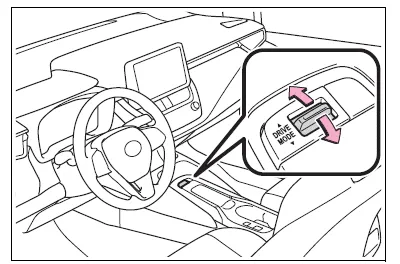
Operate the driving mode select switch forward or backward to select the desired driving mode on the multi-information display.
- Normal mode
Provides an optimal balance of fuel economy, quietness, and dynamic performance. Suitable for normal driving.
- Sport mode
Controls the transmission and engine to provide quick, powerful acceleration. This mode also changes the steering feel, making it suitable for when agile driving response is desired, such as when driving on roads with many curves.
When the sport mode is selected, sport mode indicator comes on.
- Eco drive mode
Helps the driver accelerate in an eco-friendly manner and improve fuel economy through moderate throttle characteristics and by controlling the operation of the air conditioning system (heating/cooling).
When the eco mode is selected, eco drive mode indicator comes on.
■Operation of the air conditioning system in Eco drive mode
Eco drive mode controls the heating/ cooling operations and fan speed of the air conditioning system to enhance fuel efficiency. To improve air conditioning performance, perform the following operations:
- Turn off eco air conditioning mode
- Adjust the fan speed
- Turn off Eco drive mode
■Automatic deactivation of sport mode
If the engine switch is turned off after driving in sport mode, the drive mode will be changed to normal mode.


Other materials:
Inspection procedure
Hint:
start the inspection from step 1 in case of using the hand–held tester and start
from step 2 in case of not
using the hand–held tester.
1 Perform active test by hand–held tester(abs warning light)
Check that ”on” and ”off” of the abs warning light can be shown on the
...
Description
1. Radio wave band
The radio wave bands used in radio broadcasting are as follows:
Lf: low frequency
mf: medium frequency
hf: high frequency
vhf: very high frequency
2. Service area
There are great differences in the size of the service area
for am and fm broadcasting. Sometimes ...
Safety information for
Safety Connect
Important! Read this information
before using Safety Connect.
■ Exposure to radio frequency
signals
The Safety Connect system
installed in your vehicle is a
low-power radio transmitter and
receiver. It receives and also
sends out radio frequency (RF)
signals.
In August 1996, the Federal
Communica ...