
Toyota Corolla (E210) 2019-2026 Owners Manual / Maintenance and care / Do-it-yourself service precautions
Toyota Corolla (E210): Do-it-yourself service precautions
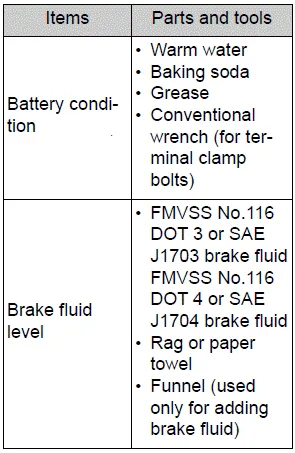
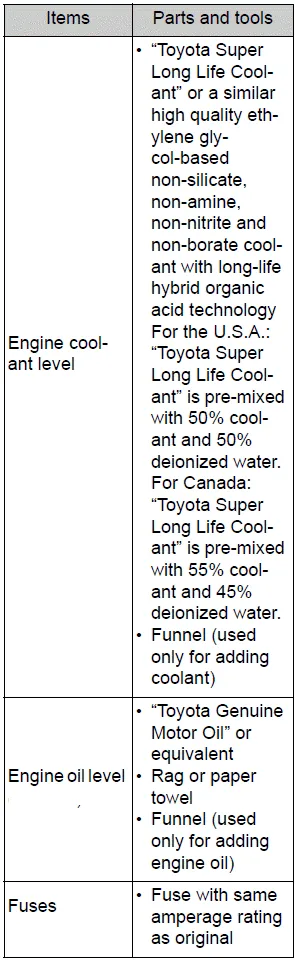
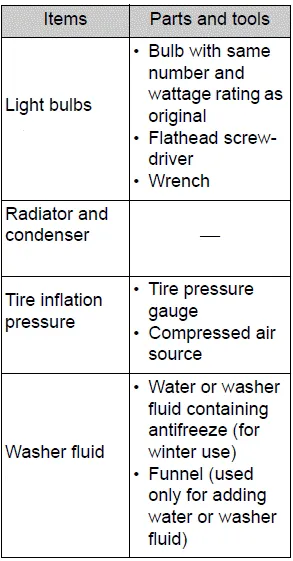
If you perform maintenance by yourself, be sure to follow the correct procedure as given in these sections.
Maintenance
WARNING
The engine compartment contains many mechanisms and fluids that may move suddenly, become hot, or become electrically energized.
To avoid death or serious injury, observe the following precautions.
■When working on the engine compartment
- Keep hands, clothing and tools away from the moving fan and engine drive belt.
- Be careful not to touch the engine, radiator, exhaust manifold, etc. right after driving as they may be hot. Oil and other fluids may also be hot.
- Do not leave anything that may burn easily, such as paper and rags, in the engine compartment.
- Do not smoke, cause sparks or expose an open flame to fuel or the battery. Fuel and battery fumes are flammable.
- Be extremely cautious when working on the battery. It contains poisonous and corrosive sulfuric acid.
■When working near the electric cooling fan or radiator grille
Be sure the engine switch is OFF.
With the engine switch in ON, the electric cooling fan may automatically start to run if the air conditioning is on and/or the coolant temperature is high.
■Safety glasses
Wear safety glasses to prevent flying or falling material, fluid spray, etc. from getting in your eyes.
NOTICE
■If you remove the air cleaner filter
Driving with the air cleaner filter removed may cause excessive engine wear due to dirt in the air.

Other materials:
Description
When troubleshooting obd ii vehicles, the only difference
from the usual troubleshooting procedure is that you
need to connect the vehicle to the obd ii scan tool complying
with sae j1978 or the hand–held tester, and read
various data output from the vehicle’s ecm.
Obd ii regulation ...
Driving
► Automatic transmission or continuously
variable transmission
1 With the brake pedal depressed, shift the shift lever to D.
(, 174, 176)
2 Release the parking brake.
3 Gradually release the brake pedal and gently depress the accelerator pedal to
accelerate the vehicle.
► ...
Lubrication system
On–vehicle inspection
1. Check engine oil level
after warming up the engine and then 5 minutes after the engine
stops, oil level should be between
the ”l” and ”f” marks on the oil level gage.
If low, check for leakage and add oil up to the ”f” mark.
Notice:
do not ...