
Toyota Corolla (E120) 2002–2008 Repair Manual / Diagnostics / Electronic controlled automatic transaxle / Customer problem analysis check
Toyota Corolla (E120): Customer problem analysis check
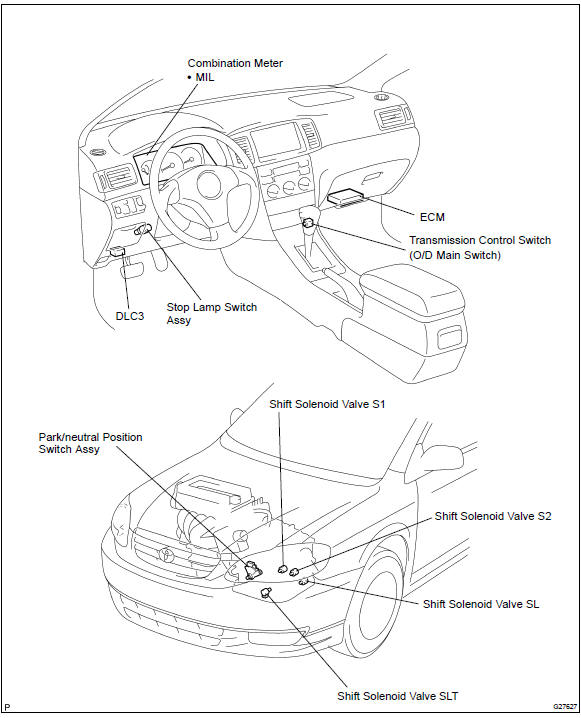
Location


Other materials:
Back up lamp assy lh
Replacement
1. Remove back up lamp assy lh
Remove the service hole cover.
remove the 2 nuts and disconnect the connector.
Using a mouldingremover, remove the 2 clips and back
up light assy lh.
2. Install back up lamp assy lh
Set the 2 clips on the back up ligh ...
Inspection procedure
Hint:
if dtcs p0115, p0116, p0117, p0118 and p0125 are output
simultaneously, the engine coolant temperature
sensor circuit may be open or short. Perform the troubleshooting of dtc
p0115, p0117 or
p0118 first.
Read freeze frame data using the hand-held tester or the obd ii scan
to ...
Optimal use of the multimedia system
On the “Sound Settings” screen, sound quality (Treble/Mid/ Bass), volume balance
can be adjusted.
How to adjust the sound settings and sound quality
1 2 3 Select “-” or “+” to adjust the treble, mid or bass to a level between
-5 and 5.
4 5 Select “Front” or “Rear” to adjus ...