
Toyota Corolla (E120) 2002–2008 Repair Manual / Audio & visual / Audio & visual system
Toyota Corolla (E120): Audio & visual system
Components
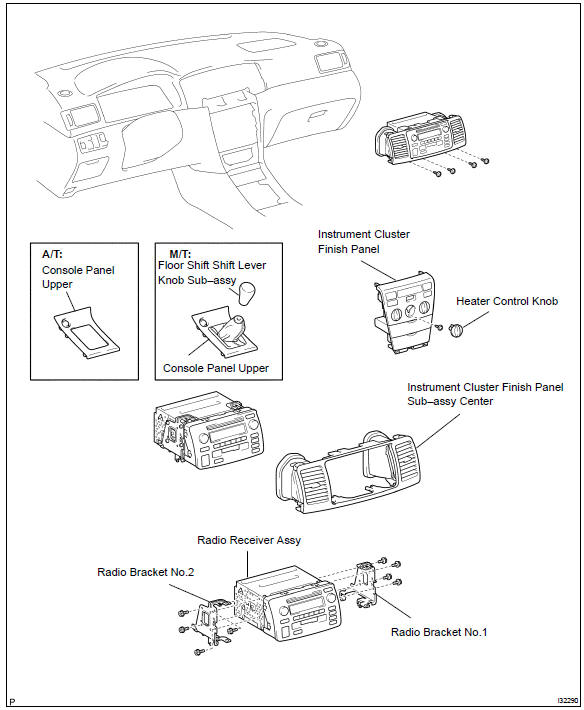
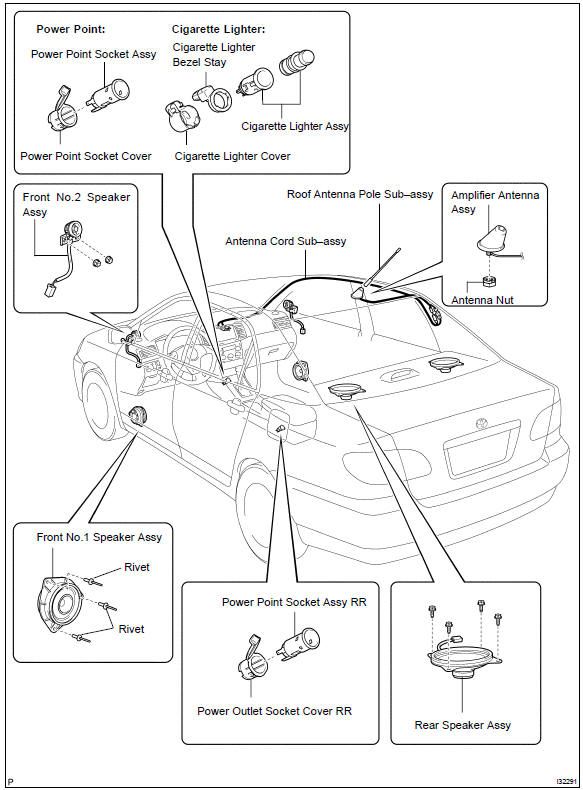


Other materials:
USB charging port (if
equipped)
The USB charging port are used
to supply 3.0 A of electricity at 5
V to external devices.
The USB charging port are for
charging only. They are not
designed for data transfer or
other purposes.
Depending on the external
device, it may not charge properly.
Refer to the manual
included with the dev ...
Replacement
Hint: components:
1. Discharge refrigerant from refrigeration system
sst 07110–58060 (07117–58080, 07117–58090, 07117–78050, 07117–88060,
07117–88070,
07117–88080)
2. Disconnect cooler refrigerant suction
hose no.1
Remove the bolt and disconnect the cooler refriger ...
Speaking on the phone
The following screen is displayed when speaking on the phone.
To adjust the call volume
Select “-” or “+”. You can also adjust the volume using the steering switches
or the volume knob.
To prevent the other party from hearing your voice
Select “Mute”.
Inputting tones
When using ...