
Toyota Corolla (E120) 2002–2008 Repair Manual / Audio & visual / Antenna cord sub–assy
Toyota Corolla (E120): Antenna cord sub–assy
Replacement
Hint
: components:
1. Remove instrument panel sub–assy upper
Hint
:
- refer to the procedure until the step, ”remove instrument panel sub–assy upper” of instrument panel sub–assy lower.
- Remove the related parts as long as the antenna cord sub–assy can be removed.
2. Remove visor holder
Hint
:
- refer to the procedure until the step, ”remove visor holder” of roof headlining assy.
- Remove the parts related to the roof headlining assy in the range that antenna cord can be cut off.
3. Remove sun roof opening trim moulding (w/ sliding roof)
4. Disconnect antenna cord sub–assy
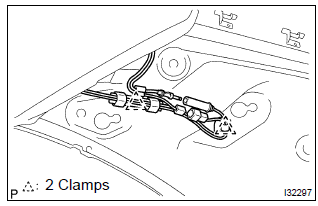
- Rear side: disconnect the connector and antenna cord plug.
- rear side: remove the 2 clamps.
- Front side: remove the 9 clamps.
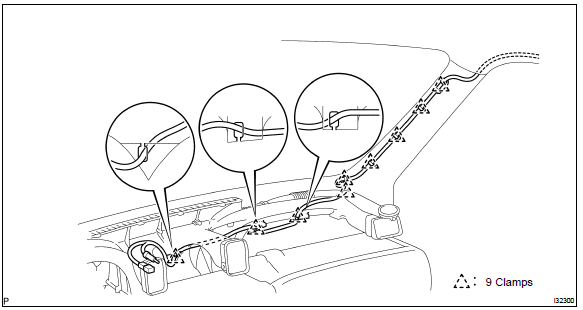
5. Remove roof headlining assy
Notice
: do not bend the roof headlining assy.
6. Remove antenna cord sub–assy
- remove the antenna cord sub–assy from the roof headlining.
7. Install antenna cord sub–assy
- tape the antenna cord sub–assy at the position of the roof headlining shown in the illustration.
Notice
:
- the antenna cord sub–assy should come to the center of the tape (100 mm(3.94 In.) X 25 mm(0.98 In.)) When taped.
- Try not to touch the adhesive side of the tape when taping.
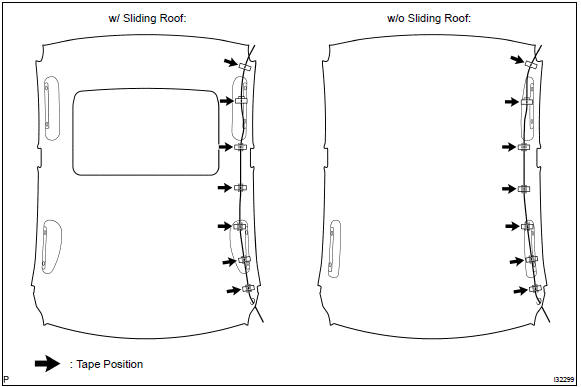
- Install the roof headlining assy .
- engage the 9 clamps at the front side of antenna cord.
- connect the plug and connector at the rear side of antenna cord.
8. Install rear seat back assy (fixed type rear seat)
9. Install rear seat back assy (separated type rear seat)
10. Install bench type rear seat cushion assy( or 72–8)
11. Install instrument panel sub–assy upper
Hint
: refer to the procedure until the step, ”install instrument panel sub–assy upper” of instrument panel sub–assy lower.


Other materials:
Luggage compartment door
Adjustment
1. Inspect luggage compartment door panel sub–assy
check that the clearance is within the standard value.
2. Adjust luggage compartment door panel sub–assy
For forward/rearward and right/left adjustments, loosen
the bolts.
Torque: 7.0 N·m (71 kgf·cm, 62 i ...
Circuit description
The side airbag sensor assy (rh) circuit consists of the diagnosis circuit
and lateral deceleration sensor, etc.
It receives signals from the lateral deceleration sensor, judges whether or not
the srs must be activated,
and detects diagnosis system malfunction.
Dtc b1140/32 is recorded wh ...
Electronic control
Removal and installation of battery terminal
before performing electrical work, disconnect the
battery negative (–) terminal cable beforehand so
as to prevent burnt–out damage by short.
When disconnecting and installing the terminal
cable, turn the ignition switch an ...