
Toyota Corolla (E170): Trip information
■ Switching the display
Items displayed can be switched by pressing the display change button.
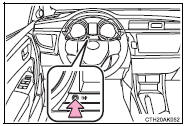
■ Odometer
Displays the total distance the vehicle has been driven.
■ Trip meter A/trip meter B
Displays the distance the vehicle has been driven since the meter was last reset. Trip meters A and B can be used to record and display different distances independently.
Press and hold the display change button to reset.


Other materials:
Replacement
1. Remove engine under cover rh
2. Drain coolant
3. Remove front wheel rh
4. Remove cylinder head cover no.2
Remove the 2 nuts, 2 clips and cylinder head cover.
5. Remove fan and generator v belt
Turn the v–ribbed belt tensioner slowly clockwise and
loosen it. Then, remove ...
Replacement
1. Work for preventing gasoline from spilling out
2. Remove cylinder head cover no.2
Remove the 2 nuts, 2 clips and cylinder head cover.
3. Disconnect ventilation hose
Disconnect the ventilation hose from the cylinder head
cover.
4. Disconnect engine wire
Disconnect ...
Inspection procedure
1 Inspect cruise control actuator assy
Inspect the cruise control actuator arm locking operation.
Turn the ignition switch to off.
Disconnect the cruise control actuator assy connector.
Connect the positive (+) lead from the battery to the
terminal 3 (l) of crui ...