
Toyota Corolla (E170) 2014–2019 Owners Manual / Instrument cluster / Gauges and meters (multi-information display) / Instrument panel light control
Toyota Corolla (E170): Instrument panel light control
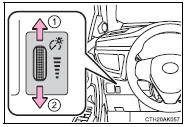
When the tail lights are on, the brightness of the instrument panel lights can be adjusted. (On vehicles with an automatic light control system, the instrument panel lights can be adjusted when the surrounding area is dark and the tail lights are on.) The brightness of the clock light can be adjusted regardless of whether the tail lights are on or off.
1 Brighter
2 Darker


Other materials:
Eco Driving Indicator Light customization (except vehicles with a manual transmission)
Eco Driving Indicator Light can be activated or deactivated.
1 While the odometer is being displayed, press and hold the “DISP” switch to
display the Eco Driving Indicator Light customization screen.
2 Press the “DISP” switch to set Eco Driving Indicator Light to on or off.
3 Press and ...
How to use this manual
General information
1. General description
This manual is made in accordance with sae j2008.
generally, repair operations can be separated in the following 3
main processes:
Diagnosis
Removing/installing, replacing, disassembling/reassembling,
checking and adju ...
Setting speed dials
1 Select “Add SD” using . 2 Select
the desired data using .
3 Press and hold the desired preset button (from
to
).
For details about setting speed dials from the call history: For details about
deleting speed dials: ...