
Toyota Corolla (E170) 2014–2019 Owners Manual / Instrument cluster / Gauges and meters (multi-information display) / Multi-information display
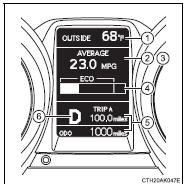
Toyota Corolla (E170): Multi-information display
1 Outside temperature display
2 Driving monitor
3 Warning messages
4 Eco Driving Indicator Zone Display*
5 Trip information
6 Shift position and gear position indicator* (, 176)
*: Except vehicles with a manual transmission


Other materials:
What to do if... (Troubleshooting)
If you have a problem, check the following before contacting your Toyota dealer.
The doors cannot be locked, unlocked, opened or closed
You lose your keys
● If you lose your keys or mechanical keys, new genuine keys or mechanical keys
can be made by your Toyota dealer.
● If you lo ...
Parking brake
The parking brake can be
set or released automatically
or manually.
In automatic mode, the
parking brake can be set or
released automatically
according to shift lever
operation.
Also, even in automatic
mode, the parking brake can
be set or released manually.
Operating instructions
■ Using the ma ...
Mass or volume air flow circuit
Dtc p0100 mass or volume air flow circuit
Dtc p0102 mass or volume air flow circuit
low input
Dtc p0103 mass or volume air flow circuit
high input
Circuit description
The maf (mass air flow) sensor measures the amount of air flowing through the
throttle valve. The ecm
uses this information ...