
Toyota Corolla (E210) 2019-2026 Owners Manual / When trouble arises / Steps to take in an emergency / If the electronic key does not
operate properly (vehicles with a
smart key system)
Toyota Corolla (E210): If the electronic key does not operate properly (vehicles with a smart key system)
If communication between the electronic key and vehicle is interrupted or the electronic key cannot be used because the battery is depleted, the smart key system and wireless remote control cannot be used. In such cases, the doors can be opened and the engine can be started by following the procedure below.
■When the electronic key does not work properly
- Make sure that the smart key system has not been deactivated in the customization setting. If it is off, turn the function on.
- Check if battery-saving mode is set. If it is set, cancel the function.
- The electronic key function may be suspended.
NOTICE
■In case of a smart key system malfunction or other key-related problems
Take your vehicle with all the electronic keys provided with your vehicle to your Toyota dealer.
Locking and unlocking the doors
Use the mechanical key in order to perform the following operations:
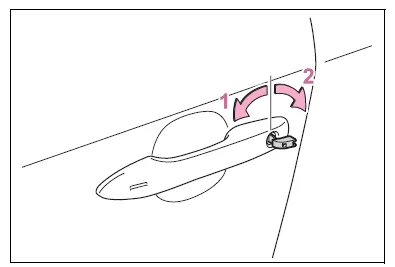
- Locks all the doors
- Unlocks all the doors
Turning the key unlocks the driver's door. Turning the key again unlocks the other doors.
■Key linked functions
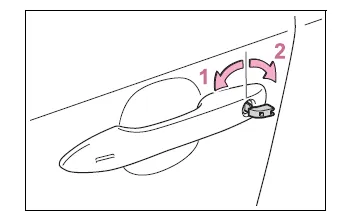
- Closes the windows and moon roof*1 (turn and hold)*2
- Opens the windows and moon roof*1 (turn and hold)*2
*1:If equipped
*2:This setting must be customized
at your Toyota dealer.
WARNING
■When using the mechanical key and operating the power windows or moon roof (if equipped)
Operate the power window or moon roof after checking to make sure that there is no possibility of any passenger having any of their body parts caught in the window or moon roof.
Also, do not allow children to operate the mechanical key. It is possible for children and other passengers to get caught in the power window or moon roof.
Starting the engine
1. Ensure that the shift lever is in P and depress the brake pedal.
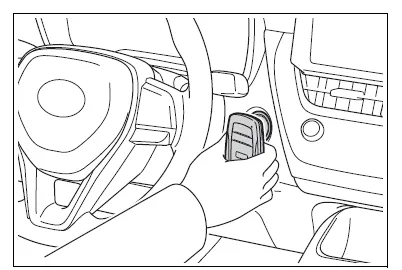
2. Touch the electronic key to the engine switch.
When the electronic key is detected, a buzzer sounds and the engine switch will turn to ON.
When the smart key system is deactivated in customization setting, the engine switch will turn to ACC.
3. Firmly depress the brake
pedal and check that  is
shown on the multi-information
display.
is
shown on the multi-information
display.
4. Press the engine switch shortly and firmly.
In the event that the engine still cannot be started, contact your Toyota dealer.
■Stopping the engine
Shift the shift lever to P and press the engine switch as you normally do when stopping the engine.
■Electronic key battery
As the above procedure is a temporary measure, it is recommended that the electronic key battery be replaced immediately when the battery is depleted.
■Changing engine switch modes
Release the brake pedal and press the engine switch in step 3 above.
The engine does not start and modes will be changed each time the switch is pressed.


Other materials:
Changing audio source
1 Press the “AUDIO” button to display the audio source selection screen.
If the audio source selection screen is not displayed, press the “AUDIO” button
again.
2 Select the desired audio source.
1 Select the desired audio source then
or
to reorder.
...
On–vehicle inspection
1. Inspect brake booster
Airtightness check.
Start the engine and stop it after 1 or 2 minutes. Depress
the brake pedal several times slowly.
Hint:
if the pedal goes down farthest at the 1st time, but gradually
rises after the 2nd or 3rd time, the booster is airtight.
...
Adjustment
1. Headlight aim only
place the vehicle in the following conditions.
The area around the headlight is not deformed.
The vehicle is parked on a level surface.
Tire inflation pressure is in the specified value .
A driver is in the driver’s seat and the vehicle is in a state rea ...