
Toyota Corolla (E120) 2002–2008 Repair Manual / Service specifications / Steering column
Toyota Corolla (E120): Steering column
Service data

Torque specification

Power steering
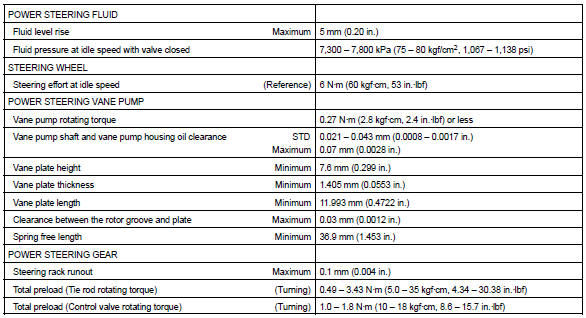
Service data
Torque specification
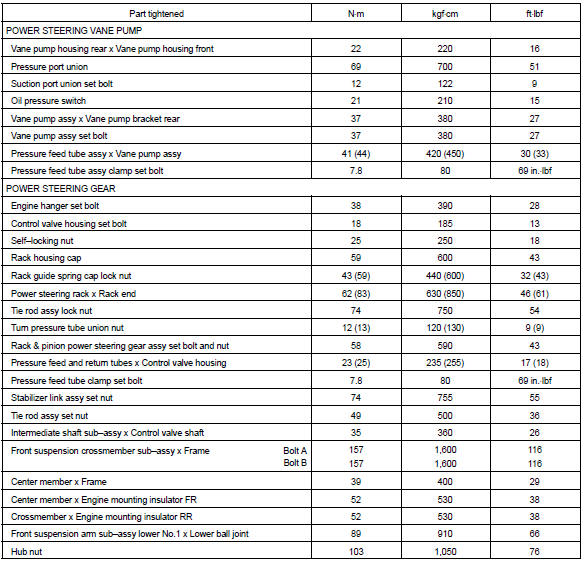
: For use without sst


Other materials:
Body
On–vehicle inspection
1. Canada:
tighten bolts and nuts on chassis and body
tighten the bolts and nuts on the chassis parts listed below, if
necessary
Front axle and suspension
drive train
rear axle and suspension
brake system
engine mounting
other chassis parts
...
Using the radio (Multimedia system)
Radio operation
Select “AM” or “FM” on the audio source selection screen to begin listening
to the radio.
Audio control screen
Pressing the “AUDIO” button displays the audio control screen from any screens
of the selected source.
1 Audio source selection screen appears
2 Preset ...
Inspection procedure
1 Inspect cruise control actuator assy
Turn the ignition switch to off.
disconnect the cruise control actuator assy connector.
measure the resistance between terminals 1 (mo) and 2
(mc) of cruise control actuator assy.
Hint:
if control plate position is fully opened or ...