
Toyota Corolla (E120) 2002–2008 Repair Manual / Service specifications / Heater & air conditioner
Toyota Corolla (E120): Heater & air conditioner
Service data

Torque specification
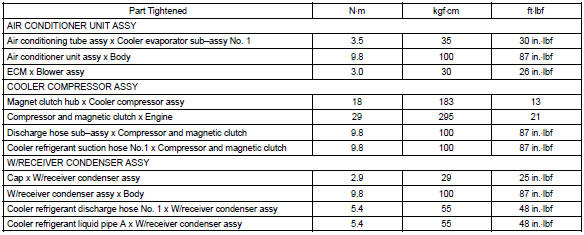
Supplemental restraint system
Torque specification
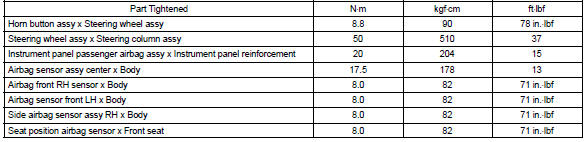
Seat belt
Torque specification
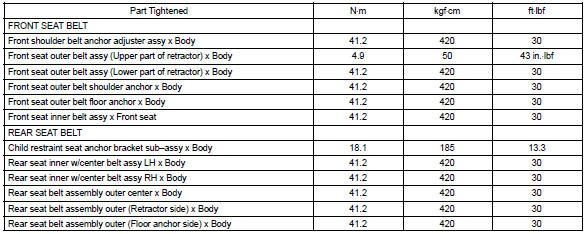
Wiper & washer
Torque specification

Audio & visual system
Torque specification

Instrument panel/meter
Torque specification

Seat
Torque specification
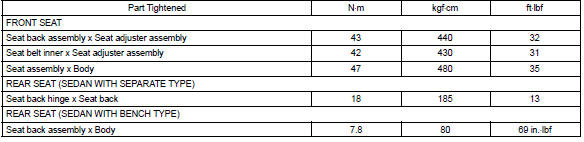


Other materials:
Refueling
Opening the fuel tank cap
Perform the following steps
to open the fuel tank cap:
Before refueling the vehicle
Turn the engine switch off and
ensure that all the doors and
windows are closed.
Confirm the type of fuel.
■Fuel tank opening for unleaded
gasoline
To help prevent incorrect fueling, ...
Eco drive mode (if equipped)
Press the switch.
Suitable for enhancing the fuel economy, because the torque corresponding to
the accelerator pedal depression amount can be generated more smoothly than it is
in normal conditions and the operation of the air conditioning system (heating/cooling)
will be minimized.
Press th ...
Basic Audio Operations
Basic audio operations and functions common to each mode are explained in
this section.
Operating the multimedia system
Random playback
Select to change on/off.
Repeat play
Select to change on/off.
■Using cellular phones
Interference may be heard through the multimedia system' ...