
Toyota Corolla (E120): Clutch
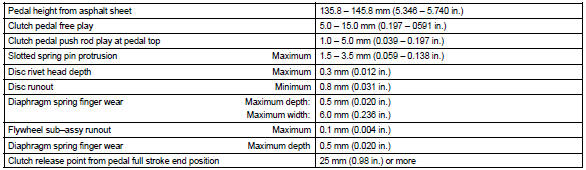
Service data
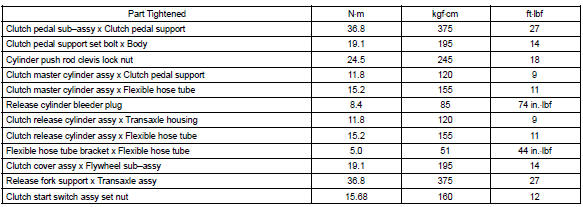
Torque specification


Other materials:
Switching the display
Press to display or hide the album
title.
If there is additional text, is
displayed.
Press and hold to display the remaining
text.
■USB memory functions
●Depending on the USB memory that is connected to the system, the device itself
may not be operable and certain function ...
Inspection procedure
1 Check security indicator light
Remove the security indicator.
check the indicator light, as shown in the illustration and
table.
Standard:
2 Check wire harness (tvip ecu security indicator)
Disconnect the tvip ecu and security indicator connectors.
...
Inspection procedure
1 Check front airbag sensor (lh) circuit (to b+)(airbag sensor assy
center – airbag sensor front lh)
Disconnect the negative (–) terminal cable from the battery,
and wait at least for 90 seconds.
disconnect the connectors between the airbag sensor
assy center and the airbag ...