
Toyota Corolla (E170) 2014–2019 Owners Manual / Interior features / Bluetooth® phone (Multimedia system) / Receiving a call
Toyota Corolla (E170): Receiving a call
When a call is received, the following screen is displayed together with a sound.
To answer the phone
Press the  switch on the steering
wheel or select
switch on the steering
wheel or select  .
.
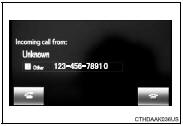
To refuse a call
Press the  switch on the steering
wheel or select
switch on the steering
wheel or select  .
.
To adjust the incoming call volume
Turn the “PWR/VOL” knob. You can also adjust the volume using the steering switches.
■International calls
Received international calls may not be displayed correctly depending on the cellular phone in use.


Other materials:
Meter display
■ Locations of gauges and meters
The units of measure may differ depending on the intended destination of
the vehicle.
Tachometer
Displays the engine speed in revolutions per minute
Outside temperature
Displays the outside temperature within the range of -40ºF (-40ºC) to 140ºF
(60ºC)
...
Initialization
1. Reset memory
Caution:
perform the reset memory (at initialization) when replacing the automatic
transaxle assy, engine
assy or ecm.
Notice:
hand–held tester only
Turn the ignition switch off.
connect the hand–held tester to the dlc3.
turn the ignition switch to th ...
Engine
On–vehicle inspection
Hint:
inspect these items on a cooled down engine.
1. Inspect drive belt
2. Replace spark plugs
3. Inspect air filter
Remove the air filter.
visually check that the air filter is not excessively damaged,
dirty or oily.
Peplace the air filter if nece ...