
Toyota Corolla (E120) 2002–2008 Repair Manual / Exterior/interior trim / Out side moulding
Toyota Corolla (E120): Out side moulding
Replacement
Hint
: use the same procedures for the rh side and lh side.
1. Remove outside moulding
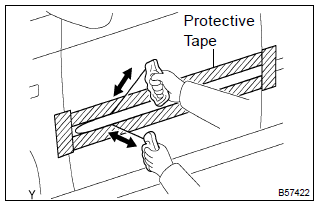
- Put protective tape around the moulding.
- insert a piano wire between the vehicle body and moulding.
- tie objects that can serve as handles (for example, wooden blocks) to all wire ends.
- pull the piano wire and scrape off the double–sided tape that holds the moulding to the vehicle body.
Notice
:
- if reusing the moulding, take care not to damage the moulding.
- Becareful not to damage the body.
- remove the moulding.
2. Install outside moulding lh
- using a heat light, heat the body.
Heating temperature: 40 to 60 c (104 to 140 f)
Notice
: do not heat the body excessively.
- remove the double–sided tape from the body.
- wipe off the stains with cleaner.
- clean the moulding (if reusing).
- Using a heat light, heat the body.
Heating temperature: 20 to 30 c (68 to 86 f).
Notice
: do not heat the moulding excessively.
- Remove the double–sided tape from the moulding.
- Wipe off the stains with cleaner.
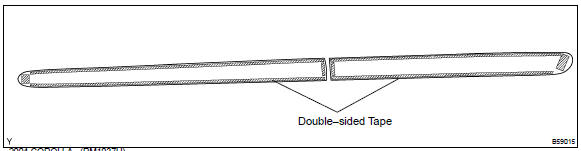
- Apply new adhesive tape to the moulding as shown in the illustration.
- Using a heat light, heat the body and moulding.
Heating temperature:

Notice
: do not heat the body and moulding excessively.
- remove the peeling paper from the double–sided tape on
the moulding face.
Notice
: when the peeling paper is removed, take care that no dirt or dust contaminates the adhesive.
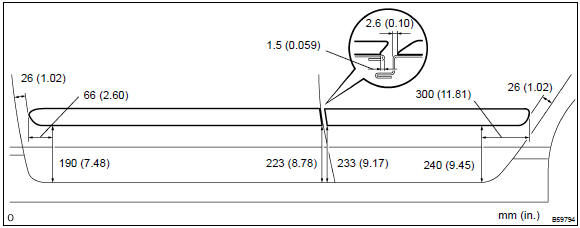
- affix the moulding to the body, as shown in the illustration.
Notice
: do not apply excessive force onto the moulding. Use steady pressure with your thumbs.


Other materials:
Circuit description
The side airbag sensor assy (rh) circuit consists of the diagnosis circuit
and lateral deceleration sensor, etc.
It receives signals from the lateral deceleration sensor, judges whether or not
the srs must be activated,
and detects diagnosis system malfunction.
Dtc b1140/32 is recorded wh ...
Driving assist systems
To help enhance driving safety and performance, the following systems operate
automatically in response to various driving situations. Be aware, however, that
these systems are supplementary and should not be relied upon too heavily when operating
the vehicle.
◆ ABS (Anti-lock Brake Sys ...
Stabilizer bar rear
Replacement
Hint: components:
1. Remove stabilizer bar rear
Remove the 2 bolts, nuts and stabilizer bar.
2. Install stabilizer bar rear
Install the 2 bolts, nuts and stabilizer bar.
Torque: 195 nvm (1,990 Kgf·cm, 144 ft·lbf)
Hint:
install the stabilizer bar so that the ...