
Toyota Corolla (E120) 2002–2008 Repair Manual / Diagnostics / Audio system / Pressing power switch does not start system
Toyota Corolla (E120): Pressing power switch does not start system
Wiring diagram
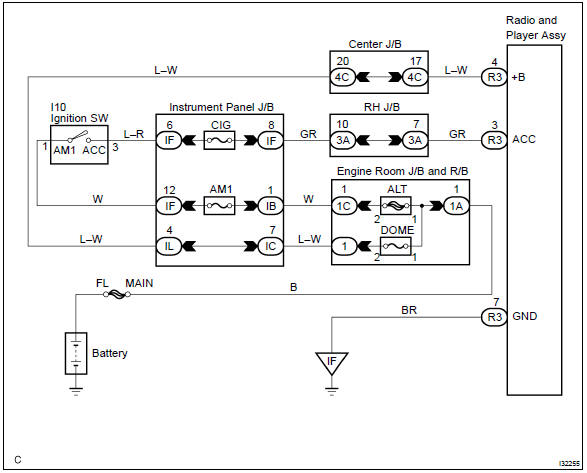
Inspection procedure
1 Inspect radio receiver assy(+b, acc, gnd)
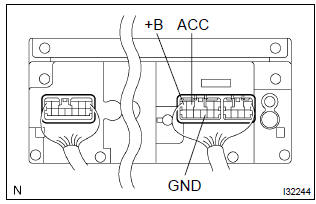
- Check that the continuity between terminals at each condition, as shown in the chart.
Standard:

- Check that the voltage between terminals at each condition, as shown in the chart.
Standard:



Check and replace radio receiver assy


Other materials:
Throttle body assy
Components
Removal & installation and disassembly & reassembly
1. Drain coolant
2. Remove cylinder head cover no.2
Remove 2 nuts, 2clips and the cylinder head cover no. 2.
3. Remove air cleaner cap sub–assy
Disconnect the maf connector.
disconnect the vsv co ...
Circuit description
1 Check p squib circuit(airbag sensor assy center – instrument
panel passenger airbag assy)
Disconnect the negative (–) terminal cable from the battery,
and wait at least for 90 seconds.
disconnect the connectors between the airbag sensor
assy center and the instrument panel ...
Diagnostic trouble code chart
Notice:
when removing the part, turn the ignition switch to off.
Hint:
using sst 09843–18040, it connect the terminal tc and cg of dlc3.
If any abnormality is not found when inspecting parts, inspect the ecu and
ground points for poor contact.
If a malfunction code is displayed during ...