
Toyota Corolla (E120) 2002–2008 Repair Manual / Diagnostics / Audio system / Although system is powered,cd cannot be played
Toyota Corolla (E120): Although system is powered,cd cannot be played
Wiring diagram
Inspection procedure
1 Check if a proper cd is inserted
- Check that a proper cd is inserted.
- Make sure that the cd is a normal audio cd, and that there is no
deformation, flaw, stain, burr
and other defects on the cd.
Standard: normal audio cd.
Reference:
- translucent or different–shaped cd cannot be played.
- Cd–rom for personal computers (with music recorded in) and recorded cd–r may not be played.
- Playing an 3.2 In. (8–Cm) cd does not require an adapter.


2 Check that a proper cd is inserted
- Check that a proper cd is inserted.
- Check whether or not the cd is inserted upside down.
Standard: not upside down.


3 Disc cleaning
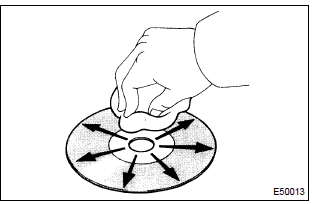
- Disk cleaning
- if the disk gets dirty, clean the disk by wiping the surface from the center to outside in the radial directions with a soft cloth.
Notice
: do not use a conventional record cleaner or anti–static preservative.


4 Replace cd with another and recheck
- Replace the cd with another and recheck.
- Replace the faulty cd with the normal one to see if the same trouble
occurs again.
Standard: malfunction disappear.


5 Check if radio auto–search functions properly
- Check if the radio auto–search function properly.
- Perform the auto–research of the radio and check that the
operation is normal.
Standard: malfunction disappear.


6 Did the temperature in the cabin change rapidly?
- Did the temperature in the cabin change rapidly?
- Check whether or not the rapid temperature change occurred in the
cabin.
Standard: the rapid temperature change occurred.
Reference: the rapid temperature change creates condensation inside the cd player, which may disable playing cd.


Check and replace radio receiver assy
7 Inspect radio receiver assy(+b, acc, gnd)
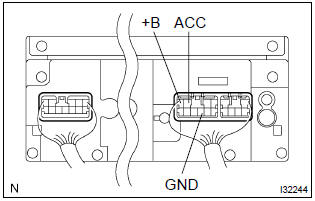
- Check that the continuity between terminals at each condition, as shown in the chart.
Standard:

- Check that the voltage between terminals at each condition, as shown in the chart.
Standard:



Repair or replace harness or connector


Other materials:
Brake Hold
The brake hold system
keeps the brake applied
when the shift lever is in D,
B (vehicles without paddle
shift switches), M (vehicles
with paddle shift switches)
or N with the system on and
the brake pedal has been
depressed to stop the vehicle.
The system releases the
brake when the accelerator
peda ...
Floor shift parking lock cable assy (atm)
Replacement
1. Precaution
2. Disconnect battery negative terminal
3. Place front wheels facing straight ahead
4. Remove horn button assy
5. Remove steering wheel assy
sst 09950–50013 (09951–05010, 09952–05010, 09953–05020, 09954–05021)
6. Remove steering column cover
7. Remove c ...
Replacement
Hint: components:
1. Precaution
2. Disconnect battery negative terminal
3. Remove horn button assy
Place the front wheels facing straight ahead.
using a torx socket wrench (t30), loosen the 2 torx
screws until the groove along the screw circumference
catches on the screw ca ...