
Toyota Corolla (E210) 2019-2026 Owners Manual / Interior features / Using the storage features / Location of the storage features
Toyota Corolla (E210): Location of the storage features
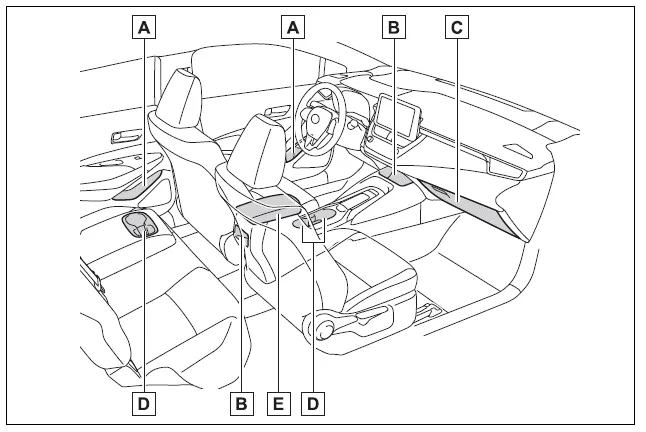
- Bottle holders/door pockets
- Open trays (if equipped)
- Glove box
- Cup holders (if equipped)
- Console box
WARNING
■Items that should not be left in the storage spaces
Do not leave glasses, spray cans in the storage spaces, as this may cause the following when cabin temperature becomes high:
- Glasses may be deformed by heat or cracked if they come into contact with other stored items.
Glove box
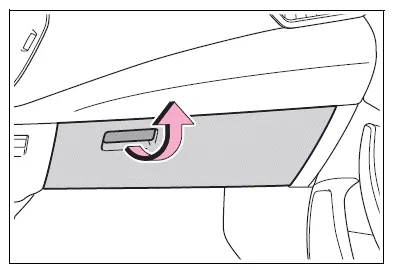
Pull up the lever to open the glove box.
■Glove box light (if equipped)
The glove box light turns on when the tail lights are on.
WARNING
■Caution while driving
Keep the glove box closed. In the event of sudden braking or sudden swerving, an accident may occur due to an occupant being struck by the open glove box or the items stored inside.


Other materials:
Circuit description
The seat belt buckle switch (lh) circuit consists of the airbag sensor assy
center and front seat inner belt
assy (lh).
Dtc b0126/b0127/27 is recorded when a malfunction is detected in the seat belt
buckle switch (lh) circuit.
Wiring diagram
...
Circuit description
The srs warning light is located on the combination meter.
When the srs is normal, the srs warning light lights up for approx. 6 Seconds
after the ignition switch is
turned from the lock position to on position, and then turns off automatically.
If there is a malfunction is the srs, the srs ...
Turn signal lever
Operating instructions
1 Right turn
2 Lane change to the right (move the lever partway and release it)
The right hand signals will flash 3 times.
3 Lane change to the left (move the lever partway and release it)
The left hand signals will flash 3 times.
4 Left turn
■Turn signals can b ...