
Toyota Corolla (E120) 2002–2008 Repair Manual / Heater & air conditioner / Air conditioning system / On–vehicle inspection
Toyota Corolla (E120): On–vehicle inspection
1. Inspect pressure switch no.1.
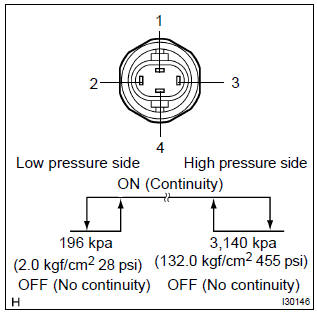
- Magnetic clutch control: inspect pressure switch operation.
- Set on the manifold gauge set.
- Connect the positive (+) lead from the ohmmeter to terminal 4 and the negative (–) lead to terminal 1.
- Check continuity between terminals when refrigerant pressure is changed, as shown in the illustration.
If operation is not as specified, replace the pressure switch.
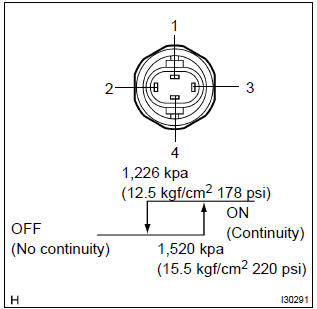
- Cooling fan control: inspect pressure switch operation.
- Connect the positive (+) lead from the ohmmeter to terminal 2 and the negative (–) lead to terminal 3.
- Check continuity between terminals when refrigerant pressure is changed, as shown in the illustration.
If operation is not as specified, replace the pressure switch.
2. Cooler compressor assy w/magnetic clutch
- connect the positive (+) lead from the battery to terminal and the negative (–) lead to the body ground.
- check that the magnetic clutch energized.
If operation is not as specified, replace the magnet clutch assy.


Other materials:
Inspection procedure
1 Prepare for inspection
Disconnect the negative (–) terminal cable from the battery, and wait at
least for 90 seconds.
remove the horn button assy .
disconnect the connector of the instrument panel passenger airbag assy
.
disconnect the connector of the front sea ...
Circuit description
The d squib circuit consists of the airbag sensor assy center, spiral cable
sub–assy and horn button assy.
It causes the srs to deploy when the srs deployment conditions are satisfied.
Dtc b1180/17 is recorded when a short is detected in the d squib circuit (2nd
step).
Wiring diagra ...
Replacement
Hint: components:
1. Precaution
2. Disconnect battery negative terminal
3. Remove parking brake hole cover sub–assy
4. Remove floor shift shift lever knob sub–assy (m/t transaxle)
5. Remove shifting hole cover sub–assy (m/t transaxle)
6. Remove console panel upper
7. Remove conso ...