
Toyota Corolla (E120) 2002–2008 Repair Manual / Drive shaft / propeller shaft / Drive shaft, propeller shaft, axle / On–vehicle inspection
Toyota Corolla (E120): On–vehicle inspection
1. Inspect front axle hub bearing
- remove the front wheel.
- separate the front disc brake caliper assy .
- remove the front disc.
- inspect the bearing backlash.
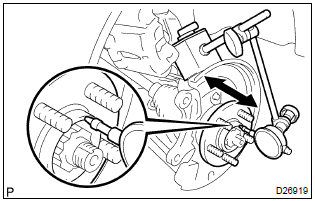
- Using a dial indicator, check the backlash near the
center of the axle hub.
Maximum: 0.05 Mm (0.0020 In.)
If the backlash exceeds the maximum, replace the front axle hub bearing.
- inspect the axle hub deviation.
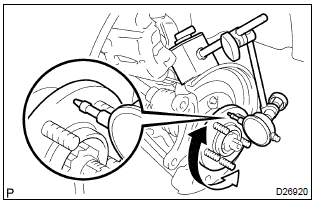
- Using a dial indicator, check the deviation at the surface
of the axle hub outside the hub bolt.
Maximum: 0.05 Mm (0.0020 In.)
If the backlash exceeds the maximum, replace the front axle hub sub–assy.
- install the front disc.
- install the front disc brake caliper assy .
- install the front wheel.
Torque: 103 nvm (1,050 Kgf·cm, 76 ft·lbf)
2. Inspect rear axle hub bearing
- remove the rear wheel.
- remove rear brake drum sub–assy.
- inspect the bearing backlash.
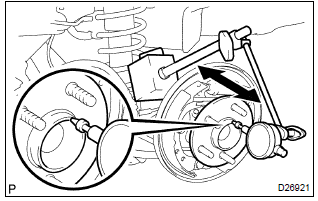
- Set a dial indicator near the center of the axle hub
and check the backlash in the bearing shaft sirection.
Maximum: 0.05 Mm (0.0020 In.)
If the backlash exceeds the maximum, replace the rear axle hub & bearing assy.
- Inspect the axle hub deviation.
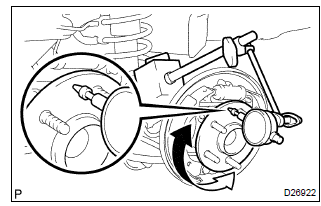
- Using a dial indicator, check the deviation at the surface
of the axle hub outside the hub bolt.
Maximum: 0.07 Mm (0.0028 In.)
If the backlash exceeds the maximum, replace the rear axle hub & bearing assy.
- install the rear brake drum sub–assy.
- install the rear wheel.
Torque: 103 nvm (1,050 Kgf·cm, 76 ft·lbf)


Other materials:
Problem symptoms table
Proceed to the reference page shown in the table below for each malfunction
symptom and troubleshoot
each circuit.
Hint:
troubleshooting of the tvip system is based on the premise that the door lock
control system and wireless
door lock control system is operating normally. Accordingly, be ...
Smart key system
The following operations
can be performed simply by
carrying the electronic key
on your person, for example
in your pocket. The driver
should always carry the
electronic key.
Locks and unlocks the
doors
Opens the trunk
Starts the engine
■Antenna location
Antennas outside the cabin
Ante ...
Vehicle information
This screen can be used to display the fuel consumption.
“Trip Information” or “Past Record” screen
Press “CAR” to display the “Trip Information” or “Past Record” screen.
Fuel consumption
■ Trip information
If the “Trip Information” screen does not appear, select â ...